fredmiranda.com
Login

Moderated by: Fred Miranda
Username  

  New fredmiranda.com Mobile Site
  New Feature: SMS Notification alert
  New Feature: Buy & Sell Watchlist
  

FM Forums | Leica & Alternative Gear | Join Upload & Sell

1       2       3              45              47              52       53       end
  

Voigtlander 28mm f/1.5 Nokton Review


Steve Spencer
Offline
• • • • • • •
Upload & Sell: On
p.46 #1 · Voigtlander 28mm f/1.5 Nokton Review


Yogifi wrote:
Thanks Steve, appreciate the handholding after I threw my tantrum on day 1! There was a comment after the first impressions about satan gargling the light and spitting it back out, that I edited out to be a little more civil.

This 28mm on a full-frame camera is my first, most of my (still limited) experience has been at around 45-50mm, and mostly taking photos of family.
I did recently pick up the 35mm Sigma f2 but I barely touched it, it was just a great price brand new and figured it would be good to have something wider with autofocus and
...Show more

Now I see what you are concerned about and let me ask what RAW converter you are using and if you are correcting for lateral chromatic aberration (CA)? I think that is what you are pointing out, and it generally cleans up really well with most converters (I use adobe camera RAW to convert to either Lightroom or Photoshop and it handles this CA really well). Lateral CA (as opposed to axial aka longitudinal) CA does not reduce as you stop down the aperture, so it will be there even at small apertures. It is especially apparent in harsh light, so you will see it less with softer light and it should clean up well in post-processing.
If you tell us about your post-processing we may be able to help you get rid of it even in these images, but there is a bit of lateral CA with the CV 28 f/1.5, but I haven't found it a problem as I can correct for it well in post processing.
It can look pretty funky and is a real color problem when uncorrected, however. I think if you get lateral CA corrected well it may help with what is bothering you about this lens.


Oct 26, 2025 at 08:30 AM
Yogifi
Offline
• •
Upload & Sell: Off
p.46 #2 · Voigtlander 28mm f/1.5 Nokton Review


Steve Spencer wrote:
Now I see what you are concerned about and let me ask what RAW converter you are using and if you are correcting for lateral chromatic aberration (CA)? I think that is what you are pointing out, and it generally cleans up really well with most converters (I use adobe camera RAW to convert to either Lightroom or Photoshop and it handles this CA really well). Lateral CA (as opposed to axial aka longitudinal) CA does not reduce as you stop down the aperture, so it will be there even at small apertures. It is especially apparent in harsh
...Show more

Thank you, well with my A7cii, I plug in the memory card to the laptop and just import it into lightroom (not classic) using "Add Images" in the top-left hand side. They are ARW files from the sony in lightroom.

I don't see any difference using adobe's convertor to get a dng (camera raw 16) first then dropping it into lightroom.

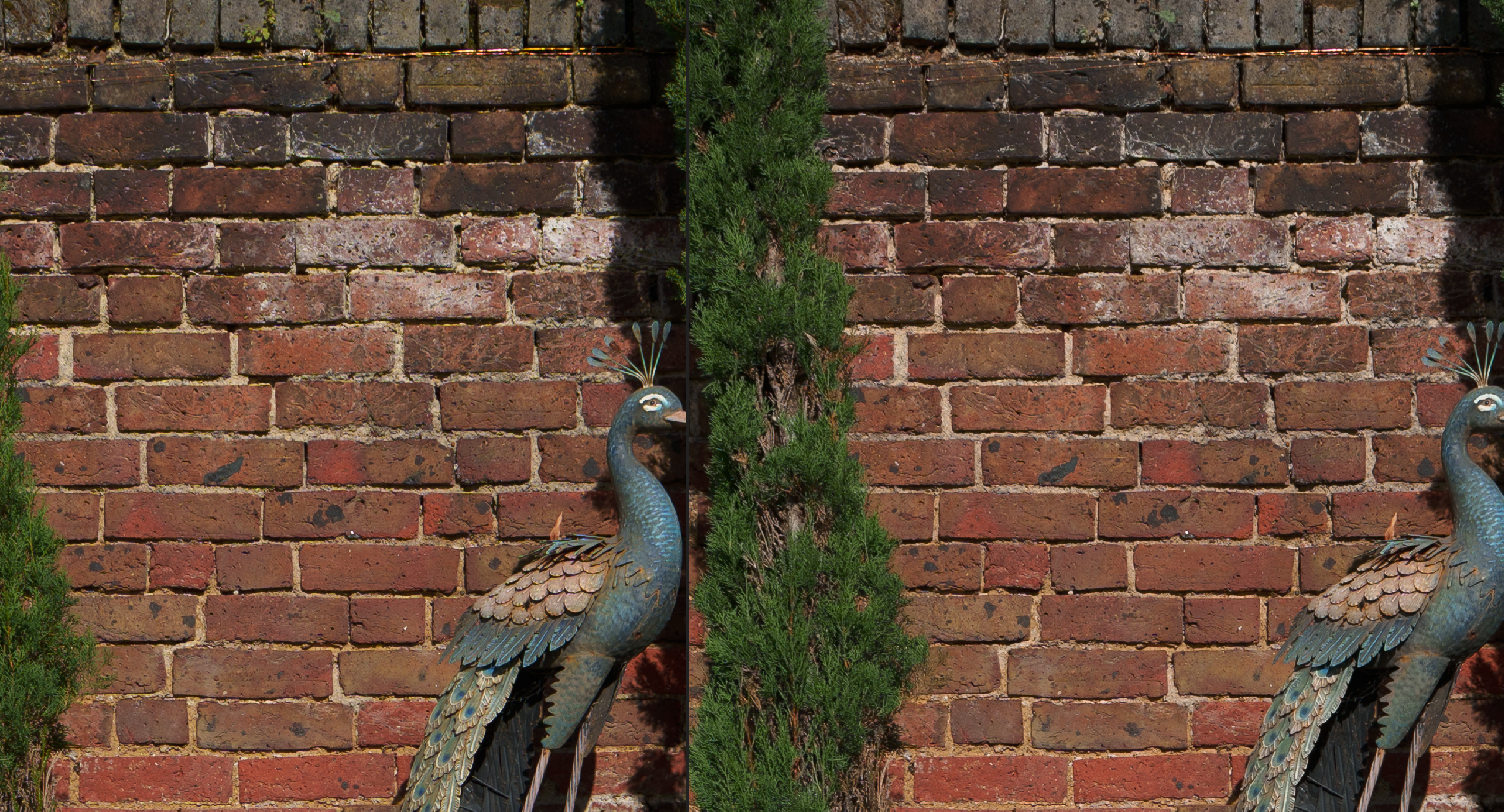
Using the defringe tool to carefully adjust the range slider to pick the colours that are "fringing" with the smallest strength until it goes away does work to remove things like the yellow on that boat's pole - but it also removes colour from objects that then turn grey that had no fringing so I'm hesitant to use it unless I'm willing to carefully examine the photo...

Quick demonstration but the video expires after two days unfortunately:
https://streamable.com/exl2h3


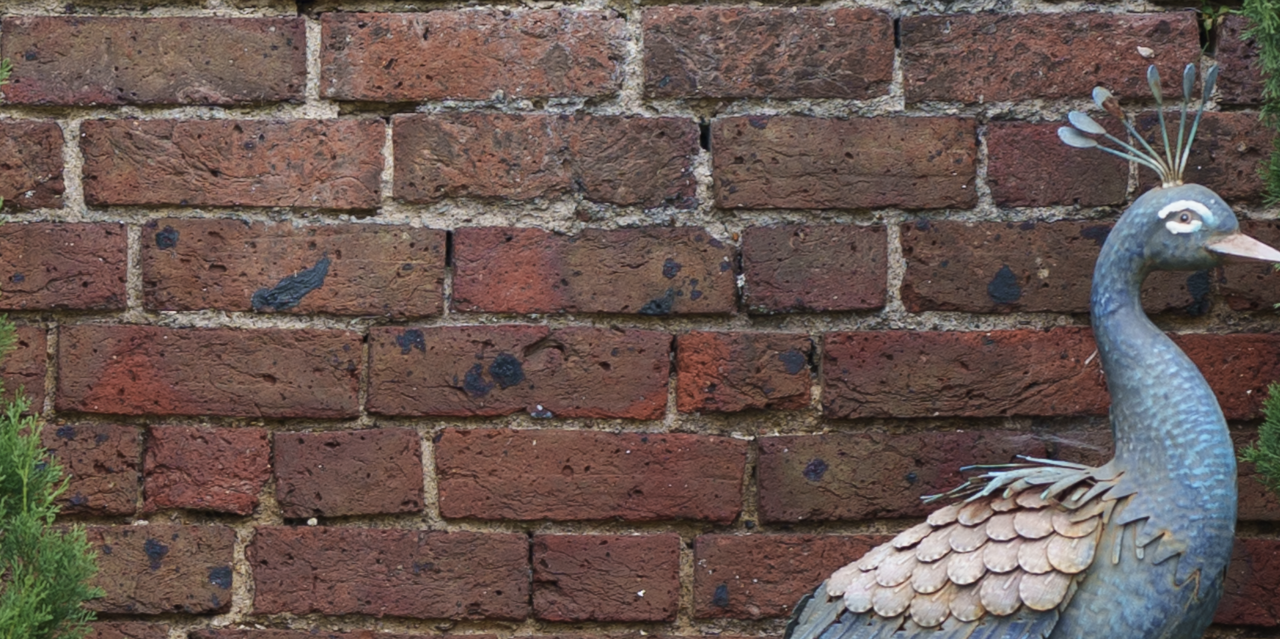
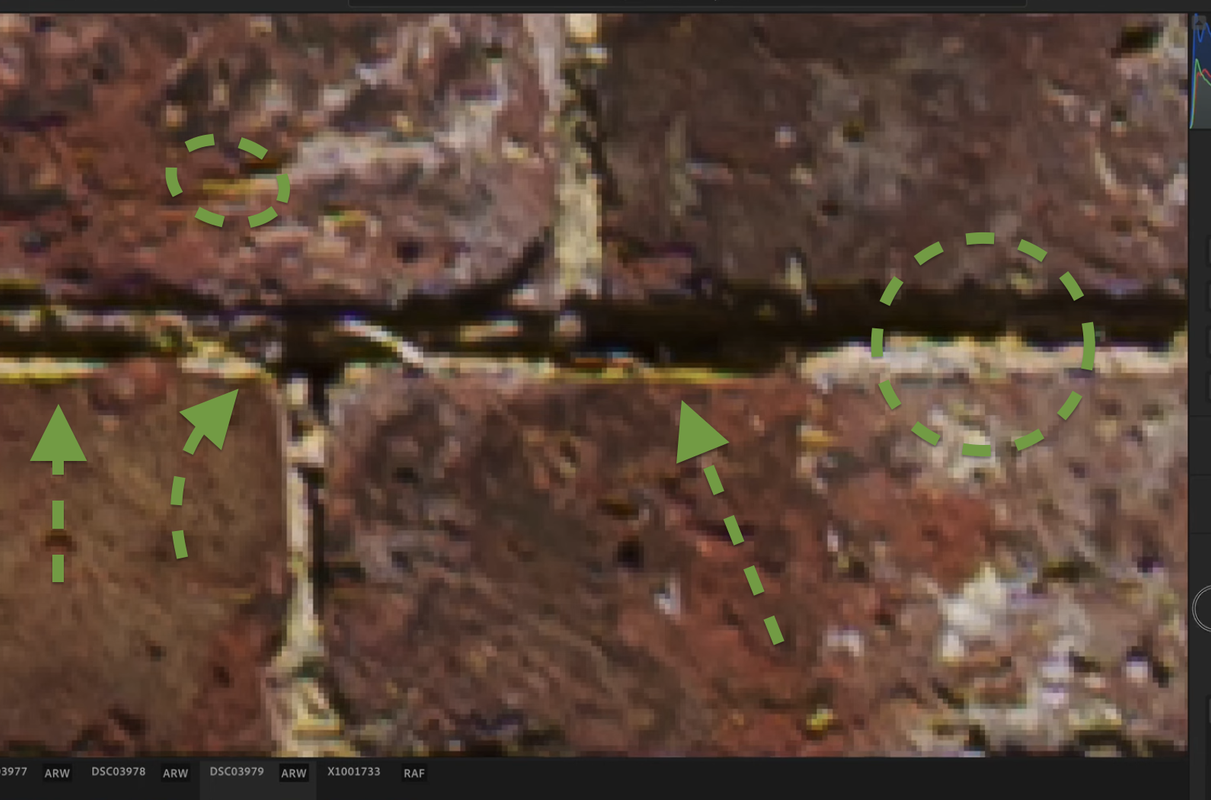
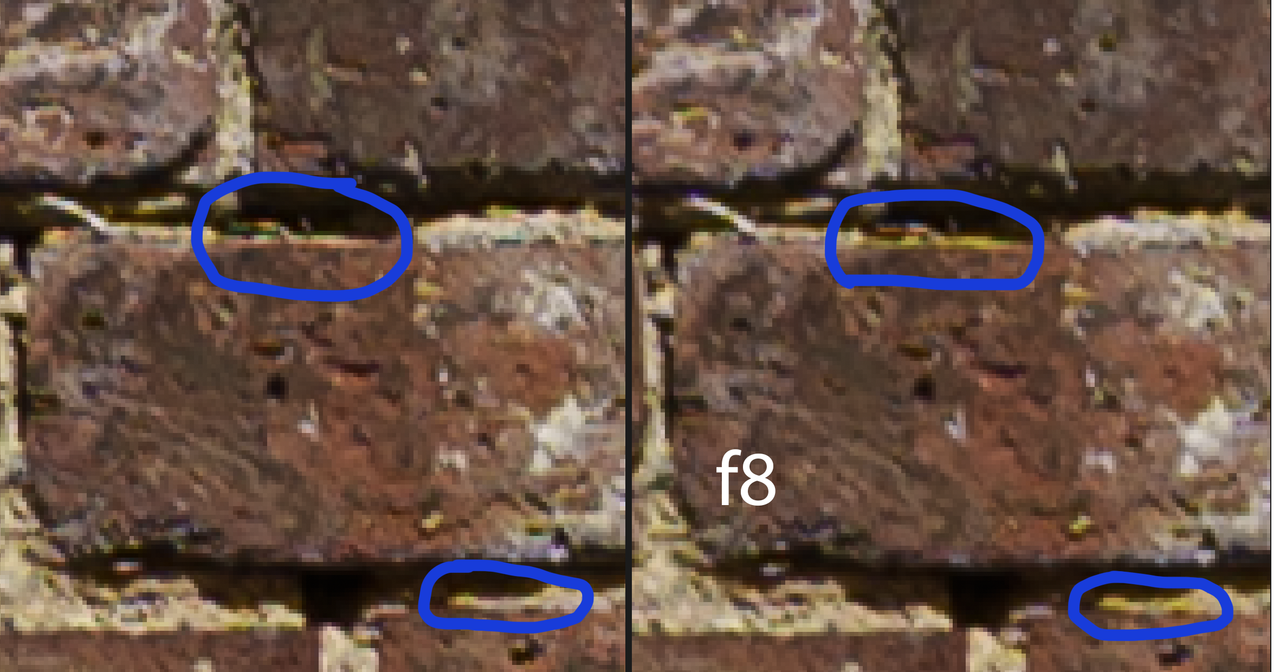
On the brick wall with the defringing tool on the right:


It does remove the excess yellow between the bricks. Might be harder to use in other images where it's less obvious / does other damage. Still a bit crunchy.

Despite the name of the tool that's not actually fringing right (longitudinal/axial), that's lateral CA? I dunno, it's CA.

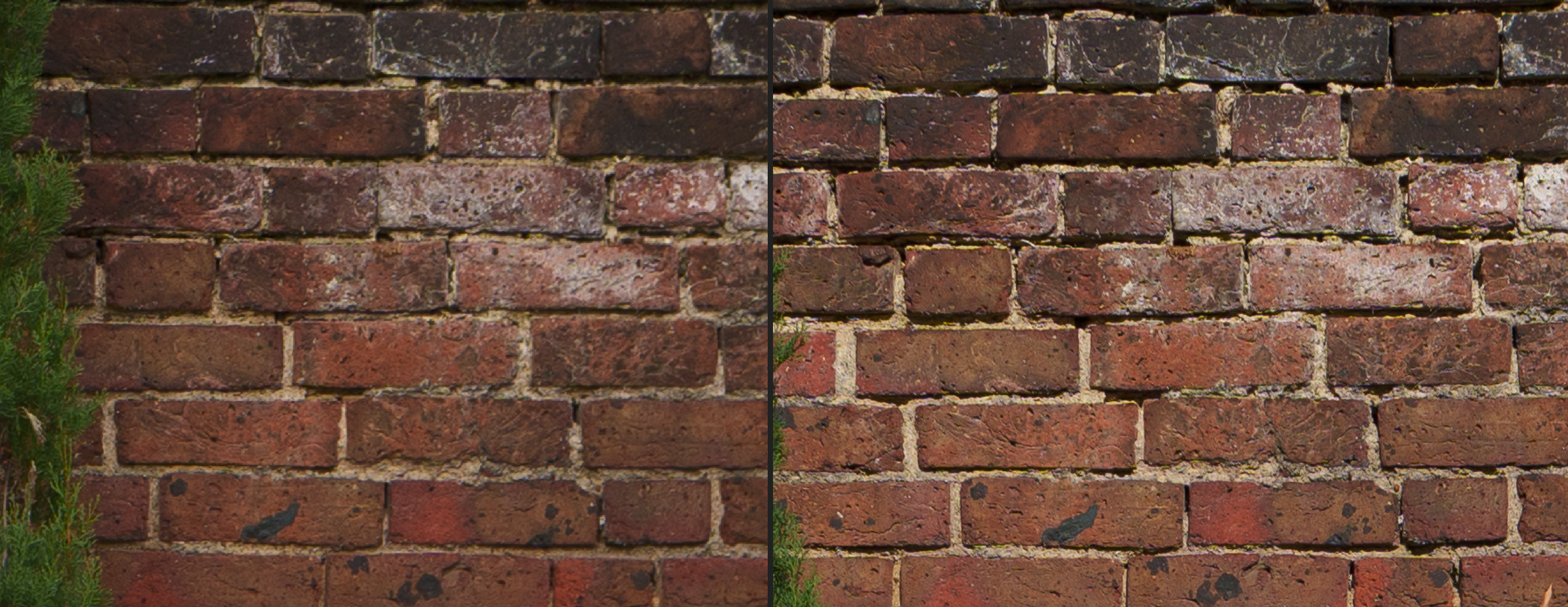
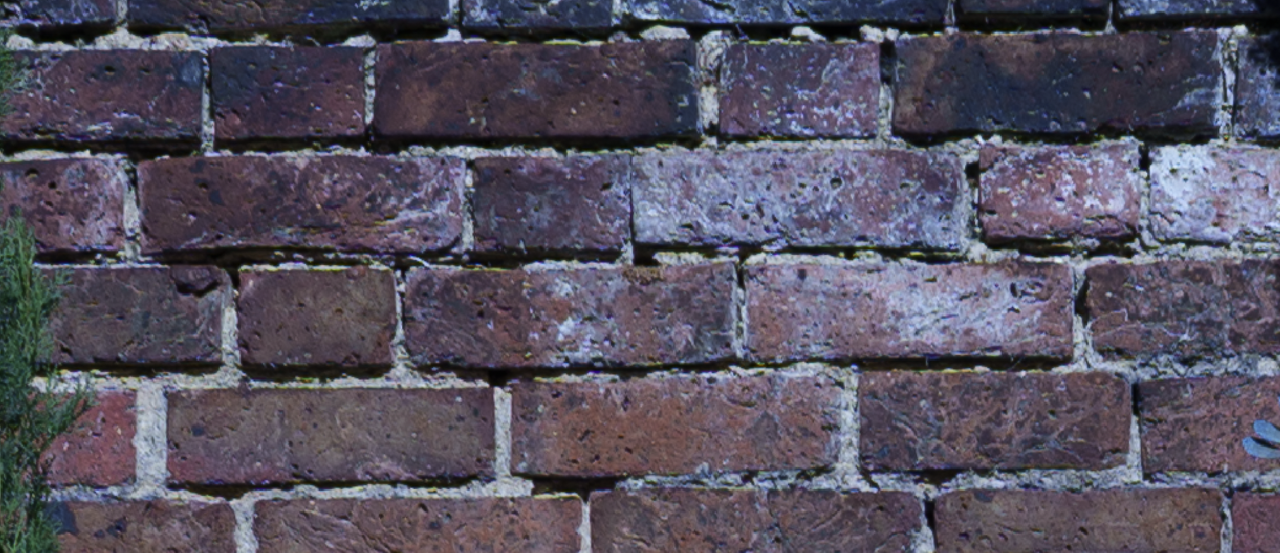
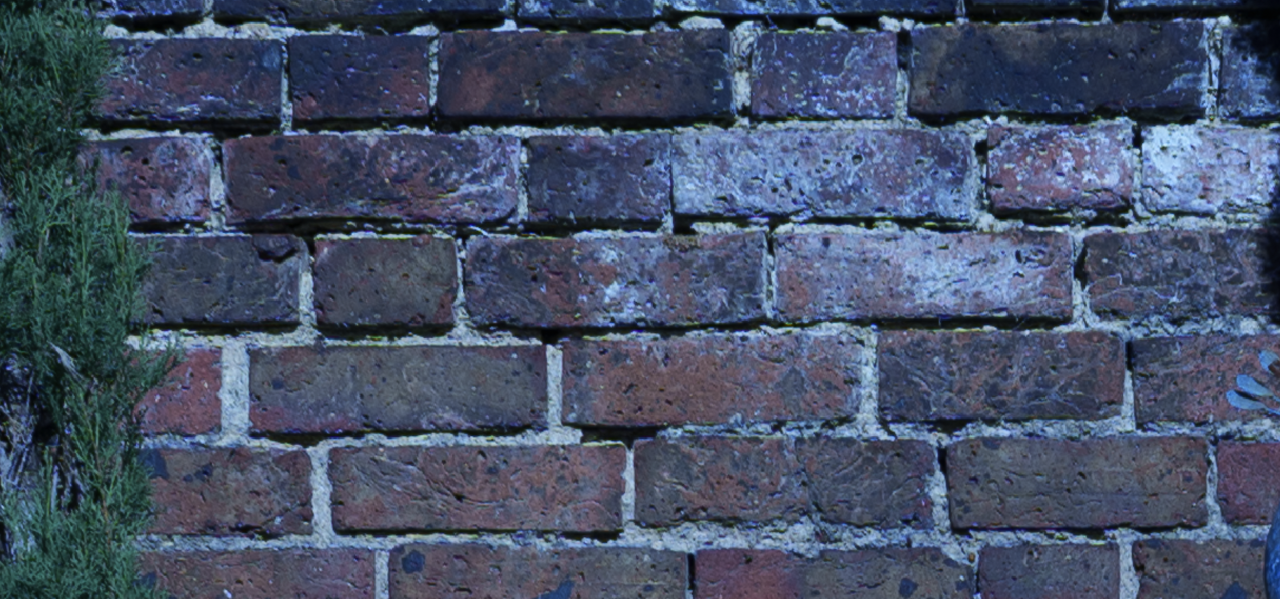
I took another image of the wall today as well, and compared it to the first day with the stronger light. I didn't get the distance quite right, so I've had to zoom in more on the left which is today's cloudy light:


You can see in the cloudy light the yellows between the bricks aren't as cyberpunk.

After your comments I re-read Fred's post about lAca (https://www.fredmiranda.com/forum/topic/1842505/8#laca) and he mentions using the "remove chromatic abberation" option in lightroom with a demonstration at infinity.
I looked really, really closely with the brick wall above and it actually is doing something very minor in my example - the image looks a tiny bit less sharp but ever-so-slightly easier on the eyes. Side-by-side it looks similar, but when I toggle it on and off and zoom in I notice something minor changing. It's not enough though.

No profile in lightroom for the lens either but not a huge deal. And sorry for all the brick wall shots folks.

Let's see a few more bright sunny days (if we get any here) if I can get results I'm as happy with after a bit more experience with getting what I want in-focus. Perhaps that's just how it should look with harsh light and I'm a noob. Because I really do like the look of it in some f1.5 people shots. Not all but sometimes it's just perfect for the look, and I'm rather happy with it in cloud/shade/not as strong light.


Oct 26, 2025 at 08:36 AM
ZdevilH1
Offline
• • •
Upload & Sell: On
p.46 #3 · Voigtlander 28mm f/1.5 Nokton Review


First time out of the house with this lens and all I can say is, what a beautiful new way to look at the world.


Oct 26, 2025 at 09:02 PM
Steve Spencer
Offline
• • • • • • •
Upload & Sell: On
p.46 #4 · Voigtlander 28mm f/1.5 Nokton Review


Yogifi wrote:
Thank you, well with my A7cii, I plug in the memory card to the laptop and just import it into lightroom (not classic) using "Add Images" in the top-left hand side. They are ARW files from the sony in lightroom.

I don't see any difference using adobe's convertor to get a dng (camera raw 16) first then dropping it into lightroom.

Using the defringe tool to carefully adjust the range slider to pick the colours that are "fringing" with the smallest strength until it goes away does work to remove things like the yellow on that boat's pole - but it also
...Show more

I have a hard time evaluating brick walls. I wish I could help you more, but I will add a few comments in hopes of helping. Axial CA if that is what you are seeing, should dramatically reduce as you stop down. On this lens there should be very little at f/2.8 and basically none at f/4. In bright light unless you want shallow depth of field I would recommend shooting this lens at f/4 or a narrower aperture. The lens really shines for scenic shots with lots of depth of field at narrower apertures. You won't have any axial CA at those apertures and the lateral CA should totally clean up just by clicking the "remove CA" box in Lightroom and I would click that box as a default with this lens--I do.

If you want to shoot at shallower depth of field, then try hard to avoid harsh light. In my shooting I always try to avoid harsh light, but if the light in harsh and you want shallow depth of field do look to shoot in a shaded area. This lens does not do well with shallow depth of field in harsh light, but very few lenses do.

Also, spend some time learning the field curvature of this lens at different focus distances. I think understanding and using that field curvature with shallower depth of field is crucial to getting the most out of this lens and what is one of the things I really like about the lens. It is not for everyone as not everyone will like the look that the field curvature creates, but I do.

Finally, shoot some shallow depth of field shots to evaluate the bokeh. This lenses bokeh has a fair bit of structure that not everyone will like. If you like smoother bokeh, like from short and medium distances with the CV 50 f/1.2, then the bokeh of this lens may not be for you. Personally, I really like the bokeh, but again that is pretty subjective. And if you like the CV 50 f/1.2, then I have hope you will find the colors from this lens to be fine in the long run. I don't see much if any differences in color from the two lenses and think they are very similar in that regard.

Good luck as you continue to use the lens.


Oct 27, 2025 at 06:07 AM
Yogifi
Offline
• •
Upload & Sell: Off
p.46 #5 · Voigtlander 28mm f/1.5 Nokton Review


Steve Spencer wrote:
I have a hard time evaluating brick walls. I wish I could help you more, but I will add a few comments in hopes of helping. Axial CA if that is what you are seeing, should dramatically reduce as you stop down. On this lens there should be very little at f/2.8 and basically none at f/4. In bright light unless you want shallow depth of field I would recommend shooting this lens at f/4 or a narrower aperture. The lens really shines for scenic shots with lots of depth of field at narrower apertures. You won't have any
...Show more

Thank you Steve, in those examples the brick wall shots are at f5.6, and even at f8 it shows the funky yellows between the bricks, so I was thinking it was the lateral CA. It wasn't about the sharpness so much, just the easiest way I had to show the colours.

Just for reference on, the viltrox 50mm f2 air (accidentally in apsc mode) on that same section of the brick wall but in softer light:


Barely any strong yellows between the bricks. Those bright yellows in the harsh light with the nokton are definitely artifacts ---- I think it's lAca. Can you get copy variation with lateral CA? Probably, right.

The defringing tool does work somewhat to improve it and in softer light I don't think there's any issue.

This was a learning experience about the significance of CA correction (will pay close attention to lateral from now on for out-and-about lenses) and how the light will affect that.
Even though I've read it before, even by Fred in this thread, I didn't internalise it or understand the significance. I think most examples show it at infinity distance.

With axial, I'm less bothered about it, I see it in the 50mmf1.2 and many other lenses I have and it's not that big of a deal for me.

Going through my 50mmf1.2 examples I've barely taken any where there's a lot of harsh light, usually I'm using it for people.
That might be part of getting a bit of a shock on the first day.

I've not shot the lens much below f5.6, unless it's at f1.5/f2 for the DOF. I'll keep the field curvature gif in mind where it curves upwards at closer distances to then curving downwards further away but I don't think I've noticed the significance of it yet.


Oct 27, 2025 at 06:42 AM
Steve Spencer
Offline
• • • • • • •
Upload & Sell: On
p.46 #6 · Voigtlander 28mm f/1.5 Nokton Review


Yogifi wrote:
Thank you Steve, in those examples the brick wall shots are at f5.6, and even at f8 it shows the funky yellows between the bricks, so I was thinking it was the lateral CA.

The defringing tool does work to remove it and in softer light I don't think there's any issue.

Just for reference on, the viltrox 50mm f2 air (accidentally in apsc mode) on that same section of the brick wall but in softer light:


Those yellows in the harsh light with the nokton are definitely artifacts ---- I think it's lAca. Can you get copy variation with lateral
...Show more

I am not sure what is creating the yellow that you are noticing in the brick wall test. It shouldn't be and I don't think is axial CA. It shouldn't be lateral CA if you click the remove CA box in Lightroom, any remaining CA after clicking that box should be minimal at most. I wouldn't read much into the defringe tool affecting it. That tool as you have seen affects a lot of things in the image and not just axial CA. I rarely find that tool useful and I can get the same effect just by playing with the colors more generally. I mostly avoid doing that.

So, what is that yellow cast in your shots? My guess, but it is just a guess is that it is a white balance issue and has more to do with the camera than the lens. Sony's auto white balance isn't that great even in their most recent cameras. I suspect if you used auto WB, then it is responsible for that cast and it can randomly make the color a bit weird. Try shooting with an appropriate set WB and see if you get the same results and try shooting another lens at the same time with that same appropriate WB. If you see the same color cast problem, only for the CV 28 f/1.5, only then would I start to worry about the colors from the lens. Otherwise I suspect it is an auto WB issue and you likely would get the same issues with another lens as well. It may be a camera issue, inconsistent and slightly off auto WB, and not really a lens issue at all.


Oct 27, 2025 at 07:01 AM
Yogifi
Offline
• •
Upload & Sell: Off
p.46 #7 · Voigtlander 28mm f/1.5 Nokton Review


Steve Spencer wrote:
I am not sure what is creating the yellow that you are noticing in the brick wall test. It shouldn't be and I don't think is axial CA. It shouldn't be lateral CA if you click the remove CA box in Lightroom, any remaining CA after clicking that box should be minimal at most. I wouldn't read much into the defringe tool affecting it. That tool as you have seen affects a lot of things in the image and not just axial CA. I rarely find that tool useful and I can get the same effect just by playing
...Show more

Appreciate your patience with this. I don't think it's white balance unfortunately.

I recorded a short narrated video over lightroom just to save both further time:
https://streamable.com/1wbg7j

It does compare it with the fuji taken at the same time and I show the effects of the remove chromatic abberation toggle and white balance adjustment.


Oct 27, 2025 at 08:19 AM
Steve Spencer
Offline
• • • • • • •
Upload & Sell: On
p.46 #8 · Voigtlander 28mm f/1.5 Nokton Review


Yogifi wrote:
Appreciate your patience with this. I don't think it's white balance unfortunately.

I recorded a short narrated video over lightroom just to save both further time:
https://streamable.com/1wbg7j

It does compare it with the fuji taken at the same time and I show the effects of the remove chromatic abberation toggle and white balance adjustment.


If it's not WB, then you got me stumped. As I said, if it is shot at f/5.6, it should not be axial CA, and if you clicked the removed chromatic aberration toggle it should not be lateral CA. So, I don't know what is causing it if it isn't WB. Do know that Fuji and Sony have very different auto WB behavior (I have both Fuji and Sony cameras). Sometimes I prefer Sony and sometimes I prefer Fuji, and sometimes they both work and sometimes they both suck, but they often produce fairly different auto WB results.


Oct 27, 2025 at 08:52 AM
Yogifi
Offline
• •
Upload & Sell: Off
p.46 #9 · Voigtlander 28mm f/1.5 Nokton Review


Steve Spencer wrote:
If it's not WB, then you got me stumped. As I said, if it is shot at f/5.6, it should not be axial CA, and if you clicked the removed chromatic aberration toggle it should not be lateral CA. So, I don't know what is causing it if it isn't WB. Do know that Fuji and Sony have very different auto WB behavior (I have both Fuji and Sony cameras). Sometimes I prefer Sony and sometimes I prefer Fuji, and sometimes they both work and sometimes they both suck, but they often produce fairly different auto WB results.


I'm can't rule out that it's not the camera/sensor, will compare it with the sigma 35mm f2 on the wall next time it's harsh lighting.
But if it was white balance it should be affecting the entire image not just bright yellow/neon slithers.

Maybe the lateral CA was so strong it confused lightroom...or only one wavelength was seeping through more than the others... I have no idea.

Anyway, thanks again for your help wtih this, will give the folks a break from this.


Oct 27, 2025 at 09:07 AM
Steve Spencer
Offline
• • • • • • •
Upload & Sell: On
p.46 #10 · Voigtlander 28mm f/1.5 Nokton Review


Yogifi wrote:
I'm can't rule out that it's not the camera/sensor, will compare it with the sigma 35mm f2 on the wall next time it's harsh lighting.
But if it was white balance it should be affecting the entire image not just bright yellow/neon slithers.

Maybe the lateral CA was so strong it confused lightroom...or only one wavelength was seeping through more than the others... I have no idea.

Anyway, thanks again for your help wtih this, will give the folks a break from this.


WB is a setting for the whole image, but it can affect only some wavelengths or at least some wavelengths a lot more than others. I am still betting it is a WB issue, but if you can do that further testing and set a WB instead of using auto, then you ought to be able to either rule out WB or see it as the cause.


Oct 27, 2025 at 09:14 AM


Search in Used Dept. 

Yogifi
Offline
• •
Upload & Sell: Off
p.46 #11 · Voigtlander 28mm f/1.5 Nokton Review


Steve Spencer wrote:
WB is a setting for the whole image, but it can affect only some wavelengths or at least some wavelengths a lot more than others. I am still betting it is a WB issue, but if you can do that further testing and set a WB instead of using auto, then you ought to be able to either rule out WB or see it as the cause.


Just to avoid all potential confusion, this stuff is what I'm referring to (I know the brick wall isn't the most pristine and it might be causing some confusion with what I'm actually talking about):


It's like what was happening with the boat pole in the distance on the previous page. That doesn't exist like that in real life. The viltrox f2 air photo I posted earlier on this page resembles what it should like. Or the example with this nokton but in daylight. Those random neon yellows shouldn't be there.

I see what you mean about the wb targetting certain colours... forgive me but with raw files, if I shoot with a custom white balance on camera or adjust it later in post, isn't it the same thing?

I adjusted the white balance temperature to be as blue as a smurf and the funky yellow artefacts still appear:


tungsten:


This is with the toggle for remove chromatic abberation on as well. I can see that option working quite well on the fuji for the same shot but it can't handle this.

I uploaded the video to youtube unlisted in case people couldn't access the streamable site:


Just out of interest, what camera are you using with this e-mount lens? I'm on the a7cii.


Oct 27, 2025 at 09:18 AM
Steve Spencer
Offline
• • • • • • •
Upload & Sell: On
p.46 #12 · Voigtlander 28mm f/1.5 Nokton Review


Yogifi wrote:
Just to avoid all potential confusion, this stuff is what I'm referring to (I know the brick wall isn't the most pristine and it's probably causing some confusion):


It's like what was happening with the boat pole in the distance on the previous page. That doesn't exist like that in real life-- it's like the viltrox picture. Or the example with this nokton but in daylight.

I see what you mean about the wb targetting certain colours... forgive me but with raw files, if I shoot with a custom white balance on camera or adjust it later in post, isn't it the
...Show more

I am going to bow out at this point. I am stumped. I agree that with RAW you can adjust WB in post and WB setting should not affect the RAW file as captured. What I am not sure about is when the RAW file is opened in Lightroom in your case whether the WB setting affects the colors in Lightroom in a way that changing the WB setting in Lightroom creates a file that would be the same as using that WB from the start. I don't know what the software is doing. It obviously uses WB when the RAW file is read into Lightroom. Does it go back to the RAW file when you change WB in Lightroom or does it work from the file that is created. Like I said, I just don't know and I am not a software programmer or even close, so I am not the one to ask. You seem to be assuming that it goes back to the RAW file or the equivalent and you get the same thing you would have got if the RAW file would have been read into Lightroom with the new WB. That may be happening, but I wonder if it actually is. I really don't know.

What I do know as I have said is that I don't think what you are seeing is axial CA and I don't think it is lateral CA either. If it isn't WB, then I don't know what it is. I don't think it is from the lens, but I could be wrong.


Oct 27, 2025 at 10:01 AM
Yogifi
Offline
• •
Upload & Sell: Off
p.46 #13 · Voigtlander 28mm f/1.5 Nokton Review


No problem at all, I understand, thank you. And I have no idea either about in-software vs in-camera white balance.

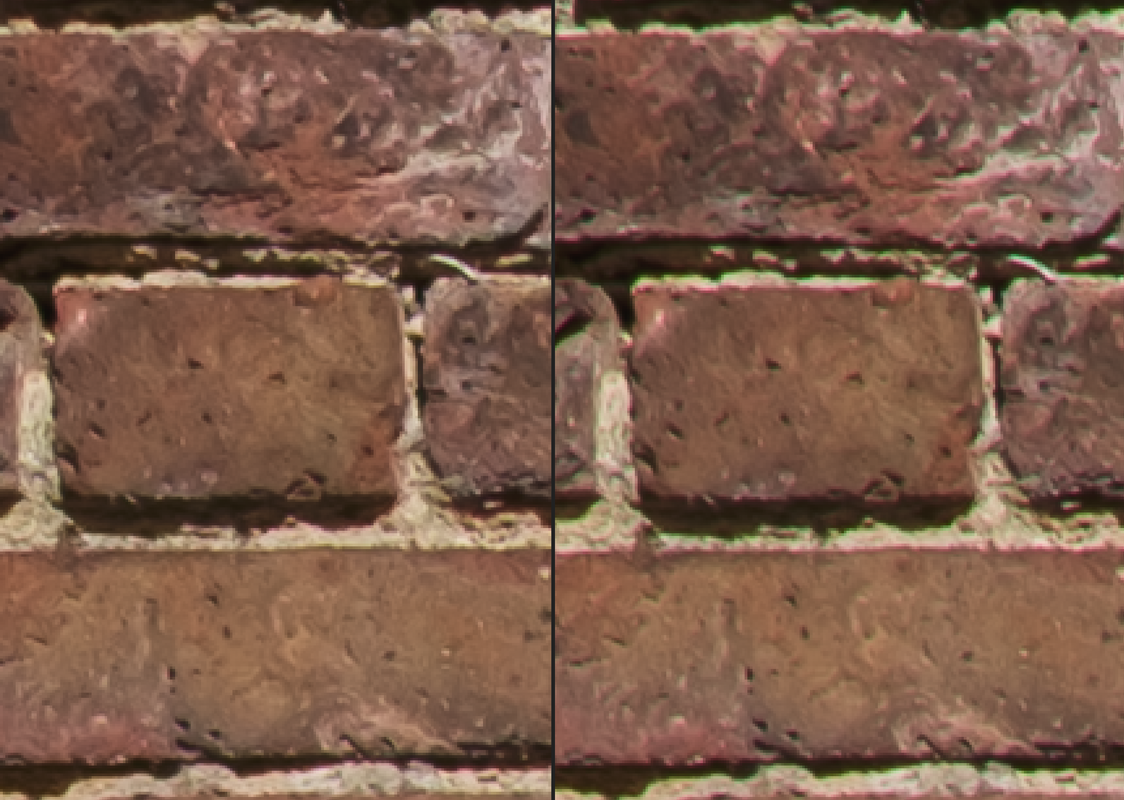
Just for science(ish), f5.6 vs f8 similar white balance in the harsh light:


I don't think a smaller aperture makes it worse (maybe, who knows), but more showing that the two shots produced slightly different artefacts.

Maybe someone knows what they are. Perhaps it's sensor related and not actually the lens.

I only noticed it in harsh light. But despite posting a bunch of bricks with a million magnification, I could see something on the image wasn't quite right without even going to 100% - soon as I opened it in lightroom, just trying to show what I'm referring to.

Defringe tool basically the only solution when it happens and does help quite a bit. Side-effects of using it aren't as noticeable as not using it.


--- In the youtube video, when looking at the shot with the fuji in similar light and disabling "remove chromatic abberation" you can see similar areas give off a faint highlight, but it's less saturated. When you enable the removal, it does a pretty good job clearing it. So I'm thinking it is lateral CA, if that tool is designed to correct for it. It's just struggling with the nokton. But I'm not sure if it's just the lens or the sensor too.


Fuji x100vi @ f5.6, left "Remove Chromatic Abberation" On, right = OFF


Anyway, still early days with the lens and I'm very happy to have it but I did order the simera while it's on sale to compare, and will likely get the APO in the future.
Thinking 28mm apo + 50mm apo when going solo with manual focus and ideally only one out of the simera and nokton when going with people for a dual-purpose lens, paired with the 50mmf1.2 nokton.


Oct 27, 2025 at 10:15 AM
Kevner
Offline
• •
Upload & Sell: Off
p.46 #14 · Voigtlander 28mm f/1.5 Nokton Review


Hmmm, I shoot in strong light all the time (it's a thing here in Nevada) and haven't seen anything like this with my E-mounty 28m Nokton. I have taken similar shots here and haven't noticed anything similar. I do use Capture 1 Pro vs Lightroom and maybe that has something to do with it. To be honest, my first reaction is that you are capture small amounts of moss in the wall. I will be out of town for a couple days, but when I get back I'll try to replicate what you have shared.

FWIW - I'm very happy with the e-mount 28mm Nokton and have been quite pleased with its performance.


Oct 27, 2025 at 04:25 PM
Yogifi
Offline
• •
Upload & Sell: Off
p.46 #15 · Voigtlander 28mm f/1.5 Nokton Review


Kevner wrote:
Hmmm, I shoot in strong light all the time (it's a thing here in Nevada) and haven't seen anything like this with my E-mounty 28m Nokton. I have taken similar shots here and haven't noticed anything similar. I do use Capture 1 Pro vs Lightroom and maybe that has something to do with it. To be honest, my first reaction is that you are capture small amounts of moss in the wall. I will be out of town for a couple days, but when I get back I'll try to replicate what you have shared.

FWIW - I'm very happy with
...Show more

Thank you Kevner, I'd appreciate that a lot! I haven't been able to get much strong sunlight here since the first day when I got it to compare with other lenses to rule out the camera itself.

Are you also using it with the A7Cii?

I thought it was moss too at first, had to go check the wall, it's not .. unfortunately I took it again in more chill light and it didn't show up. When I took it the first day, I compared with the fuji and I can see it there too but to a much lower degree and it's corrected to a decent level by lightroom's remove CA.

Could be I got a bit unlucky with my copy perhaps, not sure how variation on CA works... or the sun was particularly angry that day, or perhaps something with the a7cii sensor, I dunno - but I know I'm not (fully) crazy.

Would be interesting to see if capture one can handle it better, they do have a 7 day trial.


Oct 27, 2025 at 04:42 PM
Kevner
Offline
• •
Upload & Sell: Off
p.46 #16 · Voigtlander 28mm f/1.5 Nokton Review


Yogifi wrote:
Thank you Kevner, I'd appreciate that a lot! I haven't been able to get much strong sunlight here since the first day when I got it to compare with other lenses to rule out the camera itself.

Are you also using it with the A7Cii?

I thought it was moss too at first, had to go check the wall, it's not .. unfortunately I took it again in more chill light and it didn't show up. When I took it the first day, I compared with the fuji and I can see it there too but to a much lower degree
...Show more

I'm using an A7RV


Oct 27, 2025 at 05:30 PM
cxpics
Offline
• •
Upload & Sell: On
p.46 #17 · Voigtlander 28mm f/1.5 Nokton Review


I've been shooting both the nokton and the thypoch this year(both e-mount), here are some random snaps this year from both lenses, can anyone tell which were shot on which lens? I wouldn't worry too much about IQ from either lens. The exif data and smaller size of the nokton are tough to beat even if I might prefer the very slightly smoother draw of the thypoch a bit.


Oct 27, 2025 at 05:32 PM
rsolti13
Offline
• • • •
Upload & Sell: On
p.46 #18 · Voigtlander 28mm f/1.5 Nokton Review


cxpics wrote:
I've been shooting both the nokton and the thypoch this year(both e-mount), here are some random snaps this year from both lenses, can anyone tell which were shot on which lens? I wouldn't worry too much about IQ from either lens. The exif data and smaller size of the nokton are tough to beat even if I might prefer the very slightly smoother draw of the thypoch a bit.

https://photos.smugmug.com/photos/i-mdg6bkd/0/KPCchGXF9G3LBP5nvGQW3VwCdNGq9kCPxQp8TTkts/X4/i-mdg6bkd-X4.jpg

https://photos.smugmug.com/photos/i-BTXtg4K/0/NTtXcDQ2dLVcdSjvBbkCMG6JRKxVVnsPRs4Tsnwgb/X4/i-BTXtg4K-X4.jpg

https://photos.smugmug.com/photos/i-BkwXXzK/0/LSm4fbHKm6TqPqxGsrpt7m9BFN8PM3vHsW9DJPs57/X4/i-BkwXXzK-X4.jpg

https://photos.smugmug.com/photos/i-q93bn7H/0/NBgprNvDvLjFnHsvTfsj84kvGTVnKvrBjzmD7kPDQ/X4/i-q93bn7H-X4.jpg

https://photos.smugmug.com/photos/i-wxHbL53/0/Lk3KgPRqtRMffLz3rhPtZFJ6R697hp3tZsXdqtwDP/4K/i-wxHbL53-4K.jpg

https://photos.smugmug.com/photos/i-XMpjsJL/0/MHHkNqn4kTNdGS4kJpkjR3cpzLwnzfR7BrpkBbK5f/4K/i-XMpjsJL-4K.jpg

https://photos.smugmug.com/photos/i-wPWXfD3/0/Kb9LXRDbpXkKXpzrZMTLJvBKcS6wZ8XCZ5QSFhDjm/X4/i-wPWXfD3-X4.jpg

https://photos.smugmug.com/photos/i-gWV4tPV/0/NSHBwk9x2vsQLT9DVbQsxb33vSbN4ZPrf8MvBVwLb/X4/i-gWV4tPV-X4.jpg

https://photos.smugmug.com/photos/i-99gxZp4/0/NBvz7mkMkwmVw3JV3tmVffVfGnbnLJbqG8TzX6ngx/X4/i-99gxZp4-X4.jpg


Can you tell me which lens was #3, #4 and #6? I find the bokeh extremely distracting in those three


Oct 27, 2025 at 07:31 PM
gammarART
Offline
• •
Upload & Sell: Off
p.46 #19 · Voigtlander 28mm f/1.5 Nokton Review


I really love the colors in your shots here ✨🙌
Especially the one with the dogs on the couch 🐶🐶

What camera did you use? Any adjustments in post?


Oct 28, 2025 at 01:57 AM
Yogifi
Offline
• •
Upload & Sell: Off
p.46 #20 · Voigtlander 28mm f/1.5 Nokton Review


Lovely images as always, cxpics.

Btw about what I was posting earlier, although I haven't had sun for a while... that thing on the bricks, I noticed it on shots from the apo lanthar Juha kindly shared from the VM apo-lanthar 28mm f2. So it's probably not a lens issue, also with the a7cii. A user suggested it could be moire, also affected by high contrast areas. Just wanted to add that in as I know I gave you all a headache over it.


Oct 30, 2025 at 09:44 PM
1       2       3              45              47              52       53       end


FM Forums | Leica & Alternative Gear | Join Upload & Sell

1       2       3              45              47              52       53       end


You are not logged in. Login or Register