Notice: Undefined index: Bumped in /var/www/vhosts/fredmiranda.com/httpdocs/forum/functions_2021_i.php on line 1850
Notice: Undefined index: SecondBoardID in /var/www/vhosts/fredmiranda.com/httpdocs/forum/functions_2021_i.php on line 1851
Notice: Undefined index: LatestPoster in /var/www/vhosts/fredmiranda.com/httpdocs/forum/functions_2021_i.php on line 1852 Landscape Photographer - Photography - FM Forums
Dan Cross wrote:
This thread does not disappoint Ross! Some of the best use of texture, lines, and color I have seen here in a while. Glad you posted this set.
I would like to know more about the post processing techniques with regards to color grading. Any chance you will share a little info?
Thank you for telling me this, Dan!
In Lightroom I tend to use loose/sloppy dodge & burn selections (as learned from Charles Cramer and Michel Frye) to coax out a bit more of what the inherent color and light is doing, how it’s speaking to me and what I want it to say. Subtle movements, nothing too strong. What’s nice about White Sands is it presents a neutral palette that then picks up the subtleties of color, light, and contrast that change throughout the day and with various conditions like the windstorms.
During this windstorm I noticed on the edge of the dune field I was getting a cooler tone from reflected blue sky behind me, and as I looked deeper into the dunes the cloud of dust/sand filtered the light to be warmer. I was able to use small changes in global white balance and/or a bit of local WB change using dodge/burn mask to play up what the light & color were doing. But all my LR movements were small and gentle so as to serve the scene and not detract from it.
In some of the images I chose the Adobe Landscape color profile which gives a stronger color foundation and also keeps shadows from blocking up. The one developing move I had to make stronger was adding contrast, because the wind-stirred sand all around made the raw files too flat for proper viewing otherwise. Even after increasing contrast substantially they still look soft on contrast, and that suits the atmosphere and what was actually going on. Also, some judicial vignetting as needed to keep the eye focused inside the frame.
Ross, thank you for the detailed explanation of your technique. I would have thought you reduced the saturation in most of the images, but I guess I was mistaken. I can see the dodge and burn, but I am appreciating how subtle it is.
Again I appreciate the feedback, but now I want to try to incorporate your vision in some of my Death Valley photos.
Dan Cross wrote:
Ross, thank you for the detailed explanation of your technique. I would have thought you reduced the saturation in most of the images, but I guess I was mistaken. I can see the dodge and burn, but I am appreciating how subtle it is.
Again I appreciate the feedback, but now I want to try to incorporate your vision in some of my Death Valley photos.
Regards,
DC
Thanks again Dan. Happy to share info. No desaturation was done, the conditions took care of that.
Some of the best Death Valley dunes work I’ve seen is from FM member Gregg B. Try this link to see his 50 different thread wins, and click one of his several dunes sets, I think you’ll be inspired. You have to click the thumbnail you want to view, and then click the image in order to get to the original full set:
The chiaroscuro effects you’ve achieved are absolutely captivating—the play of light and shadow brings such depth and texture to the images. The compositions are equally impressive, with each photograph thoughtfully balancing the curves of the dunes against the vast, empty spaces. You’ve managed to convey the feeling of the wind on the sands. Even in the stillness of the frames, there’s a palpable sense of movement and change, as if the dunes themselves are alive, constantly shifting under the influence of the breeze.
Appreciate you sharing the detailed post-processing techniques.
Ross Martin wrote:
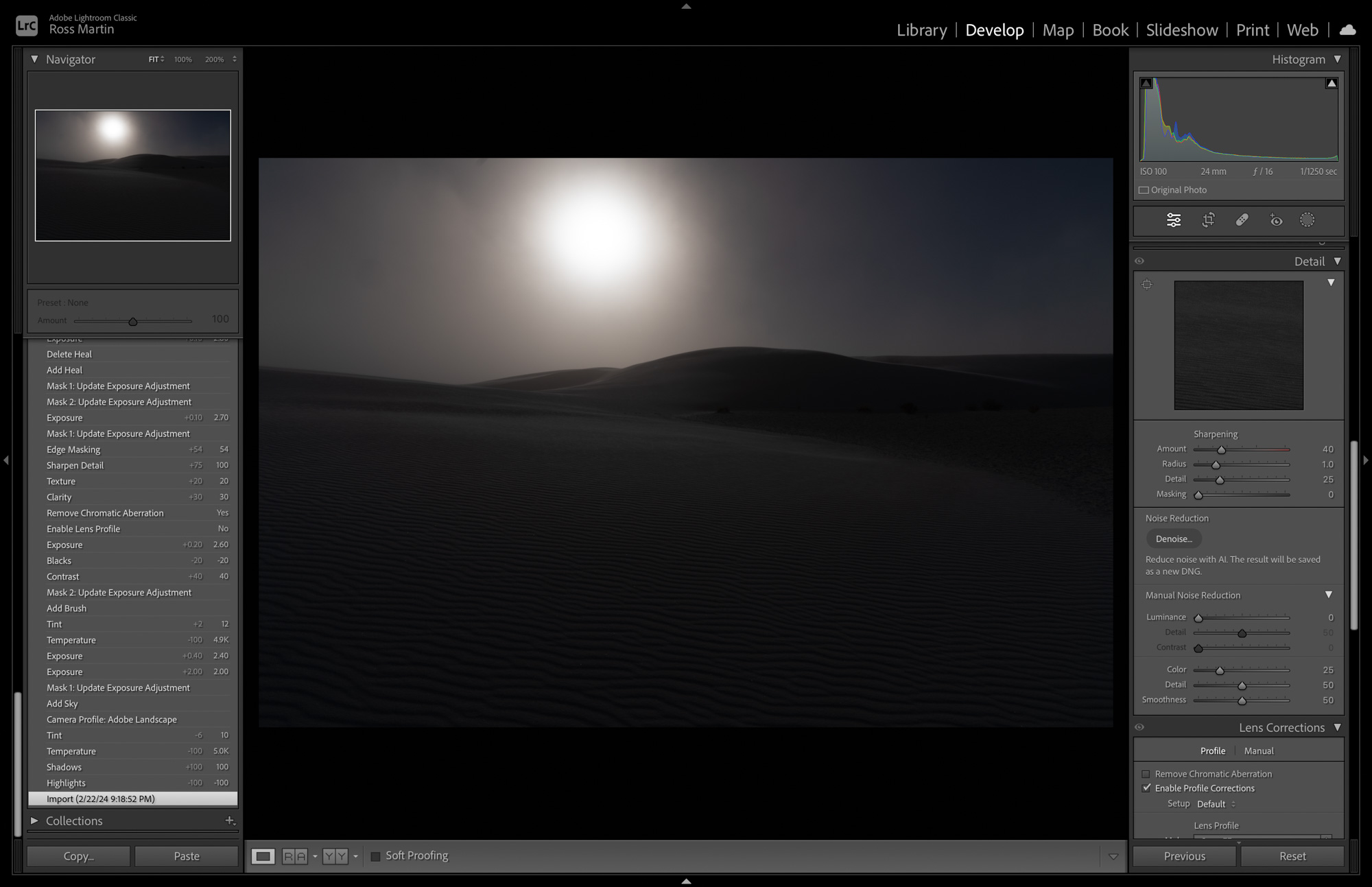
@Dan Cross@ I thought it would be interesting to show one of the raw images before any development. You can see it is dark and murky, I needed to underexpose to retain the bright sun highlight in the dust cloud, so I had some work to do before I could end up with a final image that spoke to what I experienced. Thankfully the A7RV keeps highlights from burning out better than any camera I’ve shot in the digital era, and I brought up shadows and midtones as needed. You can see in this raw file that the corners of the sky have blue showing behind the dust cloud, and that is what may look like burning in the final image but isn’t. I don’t like my dodge & brun moves to be obvious, but I will sometimes allow vignetting to show if it serves the image, especially in black & white where there is more freedom to be dramatic and graphic without color interfering....Show more →
Kudos to your workflow here Ross and Dan!
Kudos also to your analysis of vignetting in BW and color!
mabidally wrote:
The chiaroscuro effects you’ve achieved are absolutely captivating—the play of light and shadow brings such depth and texture to the images. The compositions are equally impressive, with each photograph thoughtfully balancing the curves of the dunes against the vast, empty spaces. You’ve managed to convey the feeling of the wind on the sands. Even in the stillness of the frames, there’s a palpable sense of movement and change, as if the dunes themselves are alive, constantly shifting under the influence of the breeze.
Appreciate you sharing the detailed post-processing techniques.
Mohammed, what a great analysis, thank you for communicating this. It makes me happy that the images resonated with you.
Jan 08, 2025 at 11:52 AM
Notice: Undefined index: adsensetopicmiddle in /var/www/vhosts/fredmiranda.com/httpdocs/forum/viewtopic.php on line 1500
mabidally wrote:
The chiaroscuro effects you’ve achieved are absolutely captivating—the play of light and shadow brings such depth and texture to the images. The compositions are equally impressive, with each photograph thoughtfully balancing the curves of the dunes against the vast, empty spaces. You’ve managed to convey the feeling of the wind on the sands. Even in the stillness of the frames, there’s a palpable sense of movement and change, as if the dunes themselves are alive, constantly shifting under the influence of the breeze.
Appreciate you sharing the detailed post-processing techniques.
EXACTLY!!!!!!!!
Thanks for reminding me that this still works!!!
Dan
@Dan Cross I thought it would be interesting to show one of the raw images before any development. You can see it is dark and murky, I needed to underexpose to retain the bright sun highlight in the dust cloud, so I had some work to do before I could end up with a final image that spoke to what I experienced. Thankfully the A7RV keeps highlights from burning out better than any camera I’ve shot in the digital era, and I brought up shadows and midtones as needed. You can see in this raw file that the corners of the sky have blue showing behind the dust cloud, and that is what may look like burning in the final image but isn’t. I don’t like my dodge & burn moves to be obvious, but I will sometimes allow vignetting to show if it serves the image, especially in black & white where there is more freedom to be dramatic and graphic without color interfering.
Ross Martin wrote:
@Dan Cross@ I thought it would be interesting to show one of the raw images before any development. You can see it is dark and murky, I needed to underexpose to retain the bright sun highlight in the dust cloud, so I had some work to do before I could end up with a final image that spoke to what I experienced. Thankfully the A7RV keeps highlights from burning out better than any camera I’ve shot in the digital era, and I brought up shadows and midtones as needed. You can see in this raw file that the corners of the sky have blue showing behind the dust cloud, and that is what may look like burning in the final image but isn’t. I don’t like my dodge & burn moves to be obvious, but I will sometimes allow vignetting to show if it serves the image, especially in black & white where there is more freedom to be dramatic and graphic without color interfering....Show more →
Thank you Dan. It’s been a long journey. When I switched to digital around 2007 I had been shooting large format 4” x 5” Velvia and I was spoiled to gorgeous finished images when the transparencies glowed on the light table. Raw files from digital were a shock and quite discouraging for me, as they always lacked the life and vibrancy I experienced while at the scene. It took a few great teachers (namely Robert Rodriquez Jr., Michael Frye, and Charles Cramer) and several years of work for me to finally get comfortable in Lightroom and be able to make final images that express what I saw, felt, and want to communicate.
Ross Martin wrote:
Thank you Dan. It’s been a long journey. When I switched to digital around 2007 I had been shooting large format 4” x 5” Velvia and I was spoiled to gorgeous finished images when the transparencies glowed on the light table. Raw files from digital were a shock and quite discouraging for me, as they always lacked the life and vibrancy I experienced while at the scene. It took a few great teachers (namely Robert Rodriquez Jr., Michael Frye, and Charles Cramer) and several years of work for me to finally get comfortable in Lightroom and be able to make final images that express what I saw, felt, and want to communicate....Show more →
As I learned in the military.."Improvise, adapt, overcome!"...You have done that! Took sometime but that only influences your journey Ross!
Very few straight roads to anywhere anymore!
Dan
Ross, I am just getting back to my photography addiction after a 7-year hiatus. Between a career, raising kids and a little burnout I needed some time away. I am really glad that FM is alive and well. This place has some great talent and for the most part, the people here are willing to share ideas.
I definitely will look into Gregg B’s work. One of the biggest enhancements to Lightroom since I have been editing again is the masking capabilities. Wow, this alone is a game changer. I will need to fire up some old drives to get to my Death Valley images, as the last time I was there was 2012. I will also need to brush up on my Lightroom adjustment skills.
I really appreciate the Raw image you posted, as this give me a sense of the starting point. I didn’t mean for this to derail the comments on your fine images or turn this into a tutorial, but thank you for taking the time to share some behind the scenes workflow!
I will be participating more frequently and sharing my work in the near future.