p.1 #1 · CA-F and All-Focus Pattern not using all Points Why?
Using All-focus pattern target, but autofocus only uses the large focus area in the center.
Camera OM-1 MKII, any lens I mount and with different cameras used. Using CA-F, SH2 and Silent Sequential.
When selecting “all focus points pattern” and subject detection, the subject is found and will lock focus anywhere on the screen, including the edges. This algorithm uses the whole screen.
Here is my issue that I have just noticed.
When selecting “all focus points pattern” and just CA-F, NO subject detection, the focus only appears to grab focus within the “large” pattern that is fixed in the middle of the frame. Anything outside the large pattern toward the edges the camera ignores.
If you lock onto something inside the fixed center large focus pattern, and half press shutter, you can move the camera around and it will stay locked-on in any area of the screen including the edges.
So, why is it when selecting the use of all focus points, autofocus can only autofocus within the fixed center large area
Is there a setting that I have overlooked that is preventing this? Or just the way it works?
I have been through the manual briefly and did not find any reference yet.
**Interesting to note**, I just made a “Custom” focus pattern with all the focus area. The autofocus works, and can grab focus on something that is near the edge. Whereas the factory default “ALL” does not.
p.1 #4 · CA-F and All-Focus Pattern not using all Points Why?
Sorry, I am a bit confused by 'When selecting “all focus points pattern”'
You refere to this as a pre-defined (not custom) AF taget mode. I don't seem to recall such taget mode. There are others, like Small, Middle, and Large, but I don't remember a pre-defined "all focus point pattern".
Am I missing something, or just confused? Can you name the exact, as you see this in the menue, AF target mode setting that you refere to in the OP?
p.1 #5 · CA-F and All-Focus Pattern not using all Points Why?
I checked the menus and I believe that you refer to AF Target Settings & Operations 6 --> AF Target Mode Settings --> All.
I use only "Single" in C-AF without subject detections; thus I forgot about the All setting.
On my camera (OM-1 II), in "All" C-AF auto-focus, I see that the camera priorotizes points (subject) that happen to be the closest to camera. On a flat target, such as a wall, I see clusters of small green boxes "dancing" all around the frame, starting from the central area then moving outside, and even to the edge.
p.1 #6 · CA-F and All-Focus Pattern not using all Points Why?
ruthenium wrote:
Sorry, I am a bit confused by 'When selecting “all focus points pattern”'
You refere to this as a pre-defined (not custom) AF taget mode. I don't seem to recall such taget mode. There are others, like Small, Middle, and Large, but I don't remember a pre-defined "all focus point pattern".
Am I missing something, or just confused? Can you name the exact, as you see this in the menue, AF target mode setting that you refere to in the OP?
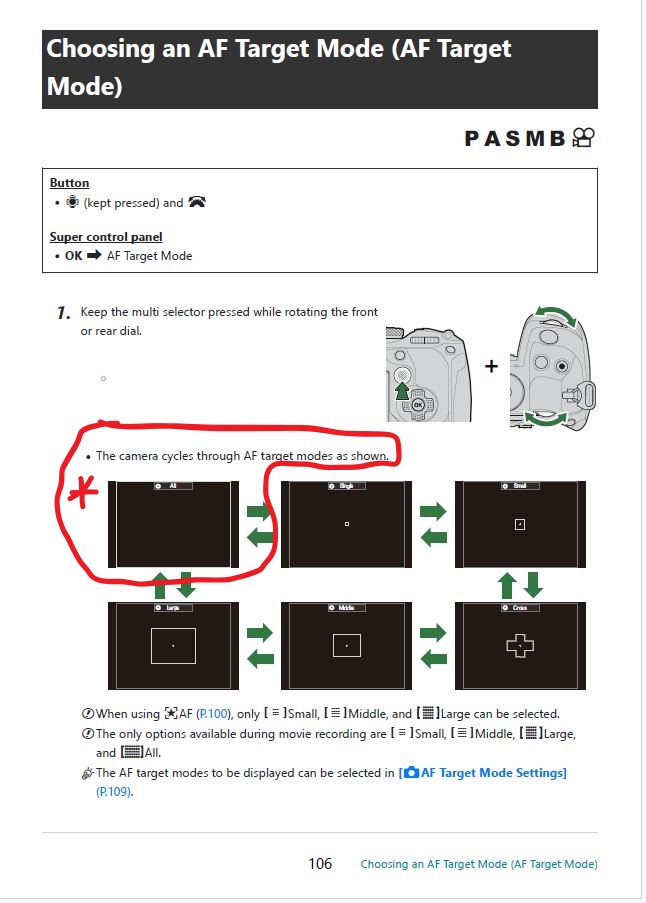
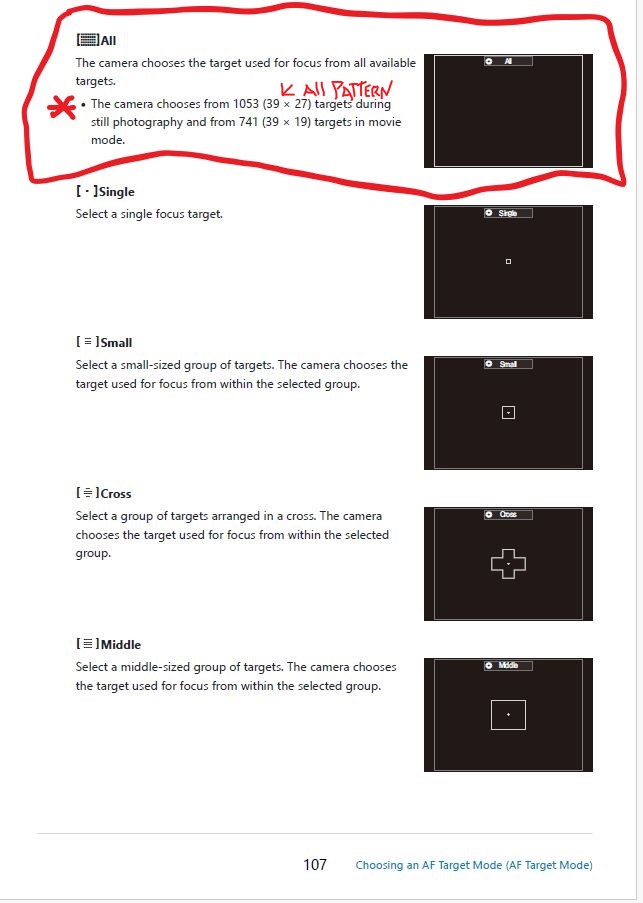
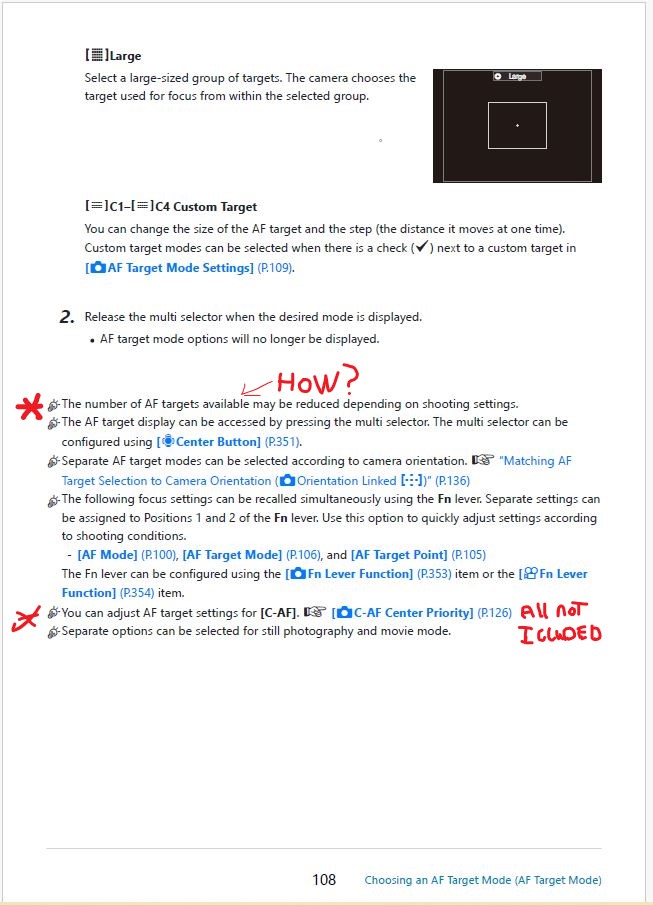
Hi Ruthenium, Thanks for further investigation. I have attached three pages from the OM-1 mk2 manual that will help you with understanding. Better that then me confusing you more with my words
The manual states that ALL pattern uses all of the 39 x 27 focus points, but it is not in my evaluation. Only the same size as a Large pattern that is fixed in the center, not the gap to the edge.
If I make a custom ALL 39 x 27 pattern the CA-F does use all the focus points.
.
p.1 #7 · CA-F and All-Focus Pattern not using all Points Why?
Thank you!
In my experience (I have checked this today) the All C-AF is not restricted to the central area (as I mentioned this above).
Thus, I don't see the behavior that you reported.
Hopefully, other users will share their experiences.
p.1 #8 · CA-F and All-Focus Pattern not using all Points Why?
Thanks Ruthenium. I sure would like to resolve this issue limiting all pattern to only the large size pattern.
I have not come across the right setting or menu yet.
I have so many configurations set up in the cameras that a total reset might take a while to match each setting and custom modes. But that might be the only way, unfortunately, unless somebody has the answer.
p.1 #9 · CA-F and All-Focus Pattern not using all Points Why?
In your observations, quote: "the focus only appears to grab focus within the “large” pattern that is fixed in the middle of the frame. Anything outside the large pattern toward the edges the camera ignores", you don't say what is in the frame. Are you pointing the camera at a flat target, like a wall, or a three-dimensional scene that has something closer to camera and other things in the frame are more distant.
In the former case, the camera really should have no clue as what to focus on, and may start from the central points, and may stay with the central points. I just don't see a viable alternative. In the latter scenario of a three-dimensional scene, the AF of OM-1 II, in my experience, has a preference to focus on anything that happens to be the closest to camera.
p.1 #10 · CA-F and All-Focus Pattern not using all Points Why?
ruthenium wrote:
In your observations, quote: "the focus only appears to grab focus within the “large” pattern that is fixed in the middle of the frame. Anything outside the large pattern toward the edges the camera ignores", you don't say what is in the frame. Are you pointing the camera at a flat target, like a wall, or a three-dimensional scene that has something closer to camera and other things in the frame are more distant.
In the former case, the camera really should have no clue as what to focus on, and may start from the central points, and may stay with the central points. I just don't see a viable alternative. In the latter scenario of a three-dimensional scene, the AF of OM-1 II, in my experience, has a preference to focus on anything that happens to be the closest to camera....Show more →
Yes "or a three-dimensional scene that has something closer to camera and other things in the frame are more distant."
Like mountains in the distance or clear sky and on the edge close would be a contrast tree limb with leaves, or flag etc. The autofocus ignores the close outside of a large size. Might try yours in this situation.
I agree that the camera will default to the center first with all pattern, then move outward. Mine stops at the edge of the a large pattern and searches no more. Customize the smaller patterns we have that menu to prioritize if we want to start in the center, but no choice on the all pattern.
And find it odd that the custom 39 x 27 pattern finds anything on the edge just fine, but not the default 39 x 27 pattern.
p.1 #11 · CA-F and All-Focus Pattern not using all Points Why?
hopefully this helps....S-AF (Single AF, target mode: All): When half-pressing the shutter, the camera quickly analyzes all available AF points and selects the one with the highest contrast, usually the nearest object within the frame. The system is designed to confirm focus as quickly as possible, so unless a specific point is chosen, it defaults to whatever is easiest to lock focus on—often subjects closer to the lens or high contrast areas anywhere in the frame.
C-AF (Continuous AF, target mode: All): In continuous autofocus, the algorithm rewards tracking consistency and prediction rather than just nearest distance. When "All" AF points are active, the camera statistically favors subjects near the center, especially if there are multiple candidates at different distances. This is by design: most photographers expect moving subjects (e.g., wildlife, sports) to be tracked through the center portion, so the algorithm is tuned to maintain tracking reliability on subjects as they move through the frame, reducing jumpiness and false acquisitions from edges or background.
Underlying logic: The difference arises because single shot AF is about quick acquisition, while continuous AF is optimized for ongoing tracking stability—hence, a center bias when "All" target mode is engaged. Olympus/OM System prioritizes center focus for stable subject tracking so that momentary distractions or edge objects do not cause distracting focus jumps while shooting sequences.
p.1 #12 · CA-F and All-Focus Pattern not using all Points Why?
jnam wrote:
hopefully this helps....S-AF (Single AF, target mode: All): When half-pressing the shutter, the camera quickly analyzes all available AF points and selects the one with the highest contrast, usually the nearest object within the frame. The system is designed to confirm focus as quickly as possible, so unless a specific point is chosen, it defaults to whatever is easiest to lock focus on—often subjects closer to the lens or high contrast areas anywhere in the frame.
C-AF (Continuous AF, target mode: All): In continuous autofocus, the algorithm rewards tracking consistency and prediction rather than just nearest distance. When "All" AF points are active, the camera statistically favors subjects near the center, especially if there are multiple candidates at different distances. This is by design: most photographers expect moving subjects (e.g., wildlife, sports) to be tracked through the center portion, so the algorithm is tuned to maintain tracking reliability on subjects as they move through the frame, reducing jumpiness and false acquisitions from edges or background.
Underlying logic: The difference arises because single shot AF is about quick acquisition, while continuous AF is optimized for ongoing tracking stability—hence, a center bias when "All" target mode is engaged. Olympus/OM System prioritizes center focus for stable subject tracking so that momentary distractions or edge objects do not cause distracting focus jumps while shooting sequences....Show more →
Hi jnam,
I’m not arguing or in doubt of anything you’ve written here.
I’d like to ask where this information came from simply because I’d like to see a lot more of such information regarding other features and such of the OM-1II. The user manual is far less informative.