fredmiranda.com
Login

Moderated by: Fred Miranda
Username  

  New fredmiranda.com Mobile Site
  New Feature: SMS Notification alert
  New Feature: Buy & Sell Watchlist
  

FM Forums | Post-processing & Printing | Join Upload & Sell

1              3       4       end
  

Color discrepancies from Lightroom to Flickr, Imgur, Windows Photos, fir...


BigBabyMoses06
Offline
• •
Upload & Sell: On
p.2 #1 · Color discrepancies from Lightroom to Flickr, Imgur, Windows Photos, firefox, and chrome/brave browsers.


Camperjim wrote:
It has also been a year or two since I did any such studies so browsers may be improved in this regard. The other issue is the amount of colors outside of sRGB.

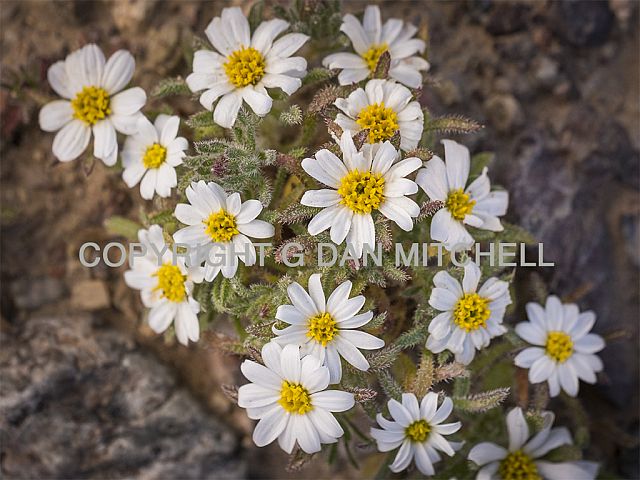
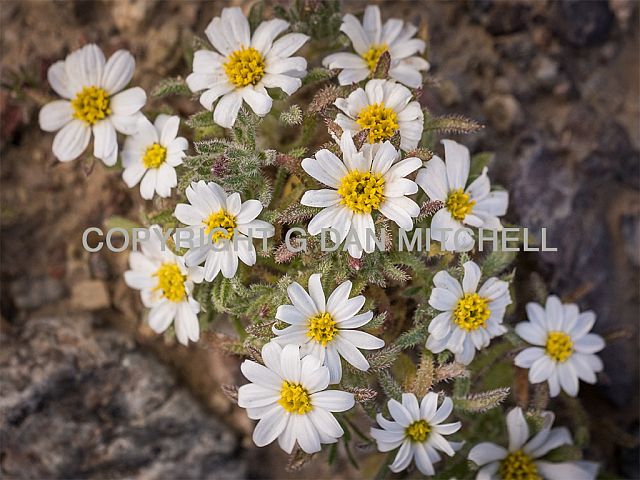
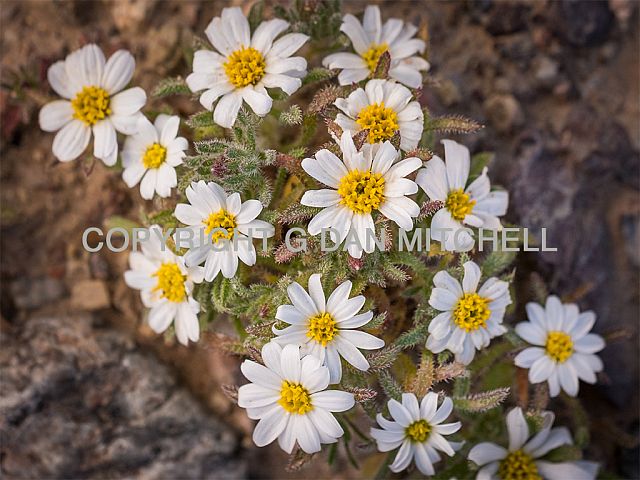
For both pairs of images above, the race cars and the flower, I see no differences between the pairs.


Very interesting! The flower has a very dramatic difference for me. In the first image, the red is muddled together, akin to a blowout highlight. In the second image, it's all clear and flowing, very detailed, every part of it. .


Mar 20, 2026 at 11:54 AM
ruthenium
Offline
• • • •
Upload & Sell: On
p.2 #2 · Color discrepancies from Lightroom to Flickr, Imgur, Windows Photos, firefox, and chrome/brave browsers.


A simple practical point illustrated by the above posts in this thread is that there is no downside to exporting jpegs with an embedded Display P3 profile. In the worst case scenario, the jpegs would look indistinguishable from the same images exported as sRGB. However, a photographer using a wide-gamut display together with jpeg viewers and browsers that can display Display P3 correctly should be rewarded by better image quality for those photos where vibrant warm colors are integral.

The usual argument in favor of sRGB is compatibility. This silently implies that the larger Display P3 can be incorrectly displayed by some "incompatible" devices (that is, would look worse than sRGB). I am not aware of practical examples of such incorrect interpretation of Display P3, and I believe that is also something that might be theoretically impossible. The embedded profile instructs the viewer apps as to how the jpeg should be displayed. An incompatible app would ignore this information; then the jpeg would be interpreted as sRGB.

Looking at sRGB and Display P3 images with vibrant warm colors is also a practical way of investigating a viewing environment. Ideally, one may want to work in a calibrated wide-gamut environment. However, simply buying an expensive wide-gamut monitor is no guarantee that this wide gamut is actually going to be utilized by the system (and if not, this would be silly and a waste of money). A photography display should be calibrated and set to use the full native gamut of the device. The choice of image viewers or browsers should also be guided by their ability to display jpegs correctly.


Mar 20, 2026 at 12:48 PM
dclark
Offline
• • • • •
Upload & Sell: On
p.2 #3 · Color discrepancies from Lightroom to Flickr, Imgur, Windows Photos, firefox, and chrome/brave browsers.


It is not true that there is no downside posting images in a wide gamut profile, although IMO the downside cases are rare. If the browser, image viewing application, or the web site are not properly color managed they may take the RGB values of a wide gamut image and interpret them as RGB values encoded in a narrow gamut such as sRGB, or potentially worse yet, just send them to the display without any color management. If the wide gamut RGB values (e.g. Adobe RGB, P3 Display RGB, ProPhotoRGB) are rendered as sRGB the colors are attenuated, the opposite of what is intended by encoding color in a wide gamut profile.

All popular browsers reliably color manage files that have embedded profiles. That has been the case for many years. For example, Firefox has been color managed since 2009. The problem can be encountered if the image file does not have a color profile embedded. Then browsers vary in how that is handled and may depend on browser settings. For example, the default with Firefox is that an image file with no embedded profile is sent to the display without color management. The results are unpredictable. Most browsers assume image files without embedded profiles are encoded in sRGB. If that is correct the colors are OK, otherwise the results are unpredictable but usually result in attenuated colors. Firefox can be setup so that it assumes files without an embedded profile (i.e. "untagged") are sRGB. As mentioned by the OP, if the user adjusts the color management settings using Firefox's settings about:config to set gfx:color_management.mode to 1 (the default is 2), then if there is no embedded profile Firefox will assume the color is encoded on sRGB. I believe that is the best setting. It is also possible to set it to 0, which is no color management.

I do not believe that it is a good idea to encode all images in sRGB to avoid problems. If the profile is embedded in your image file, all popular browsers handle those files properly. It is not a good idea to export images without embedded profiles. LrC will not allow files to be exported without an embedded profile. Some older programs, like PS, will allow it but that option should not be used. Unfortunately there are a few image viewing applications and web sites that mangle color management even if profiles are embedded, although their numbers have declined a lot over the past few years. Rather than sacrifice the advantages of color management, I recommend boycotting the use of antiquated applications and web sites.

BTW, if you want to test whether your system can successfully display wide gamut files, go to wide-gamut.com and run their test.


Mar 20, 2026 at 01:30 PM
Camperjim
Offline
• • • • •
Upload & Sell: On
p.2 #4 · Color discrepancies from Lightroom to Flickr, Imgur, Windows Photos, firefox, and chrome/brave browsers.


BigBabyMoses06 wrote:
Very interesting! The flower has a very dramatic difference for me. In the first image, the red is muddled together, akin to a blowout highlight. In the second image, it's all clear and flowing, very detailed, every part of it. .


Which browser are you using?


Mar 20, 2026 at 03:04 PM
gdanmitchell
Offline
• • • • • • •
Upload & Sell: Off
p.2 #5 · Color discrepancies from Lightroom to Flickr, Imgur, Windows Photos, firefox, and chrome/brave browsers.


dclark wrote:
It is not true that there is no downside posting images in a wide gamut profile, although IMO the downside cases are rare. If the browser, image viewing application, or the web site are not properly color managed they may take the RGB values of a wide gamut image and interpret them as RGB values encoded in a narrow gamut such as sRGB, or potentially worse yet, just send them to the display without any color management. If the wide gamut RGB values (e.g. Adobe RGB, P3 Display RGB, ProPhotoRGB) are rendered as sRGB the colors are attenuated, the opposite
...Show more

The issue goes a bit beyond just browsers. For example, when I place an image as a header in some social media apps, the color does not render correctly. Oddly, if I place the same image in a _post_ using the app, it does.

It is still a mess…


Mar 20, 2026 at 03:31 PM
John Wheeler
Offline
• • •
Upload & Sell: Off
p.2 #6 · Color discrepancies from Lightroom to Flickr, Imgur, Windows Photos, firefox, and chrome/brave browsers.


ruthenium wrote:
Here is an example of differences between the two color profiles:
The top image was exported as sRGB and the next was exported with Display P3 color profile.

I suggest downloading these jpegs for viewing on your computer, in addition to viewing in a browser.

If you don't see an obvious difference (by looking at the flower) between the two, then either your display isn't set to display its full native gamut (or has a small native gamut), or the viewer app doesn't render the jpegs correctly. Somewhat counterintuitively, in some apps, the latter problem can possibly be helped by disabling (unchecking) "Enable
...Show more

Great example @ruthenium
One thing I think I spotted that does not change the answer, yet it may for look different for some viewers. I am pretty sure your top sRGB image does not have any embedded color space or profile information, while the bottom P3 image does.

Thanks for the clear demonstration of the two color profiles with the flower.
John Wheeler


Mar 20, 2026 at 04:03 PM
gdanmitchell
Offline
• • • • • • •
Upload & Sell: Off
p.2 #7 · Color discrepancies from Lightroom to Flickr, Imgur, Windows Photos, firefox, and chrome/brave browsers.


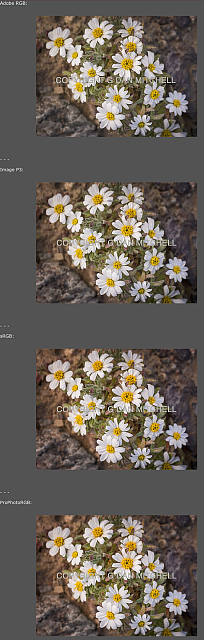
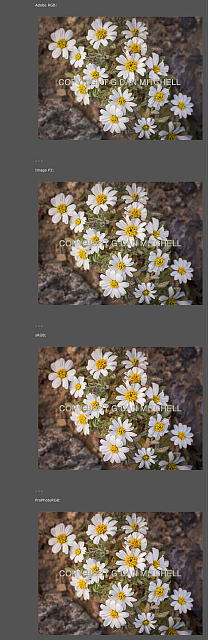
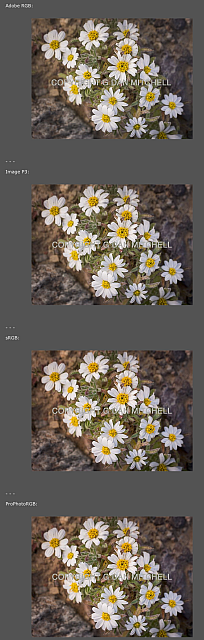
For fun.

Four versions of the same image in four different color spaces:

Adobe RGB:


- - -

Image P3:


- - -

sRGB:


- - -

ProPhotoRGB:


Here are the sets of four images viewed in three browsers than I happen to have on this machine. (Apologies for the small sizes, but I wanted to ensure that each set was in one image file. There are various ways that you can probable figure out to see them larger. Even at the small sizes, I think you should be able to spot some inconsistencies in color rendering.)

Safari


Firefox


Duck Duck Go


Mar 20, 2026 at 10:47 PM
Camperjim
Offline
• • • • •
Upload & Sell: On
p.2 #8 · Color discrepancies from Lightroom to Flickr, Imgur, Windows Photos, firefox, and chrome/brave browsers.


Dan, for PC users you omitted the big, big choices for browsers; i.e., chrome which dominates the market and Edge which includes a very high percentage of the non-chrome, PC users.

Anyway I took this topic to ChatGPT and asked a series of questions, I got pages of responses. Here are a few of the comments:

First as mentioned by others in this thread, the biggest issue by far is the use of impeded color spaces. Results are likely to be far worse without an impeded space because most browsers such as Chrome and Edge will assume and attempt to display as sRGB. This can result in washed out and altered colors.

Second, even with an impeded space results will depend on the specific image and the colors outside of sRGB gamut. Outside of gamut colors are typically going to be colors such as vivid or intense colors. (The images you posted had very subdued looking colors. I did not check, but doubt much was out of even sRGB.)

Third, webpages typically assume and utilize sRGB and do a miserable job of display with out of gamut colors and even including an impeded color space may not help.

Fourth, results also depend somewhat on the gamut of the viewer's monitor and the specific browser they use.

Anyway, Chat highly recommends converting to sRGB for internet use. Even a relatively small space such as Adobe RGB can cause dull and flat washed out colors especially when colors are out of sRGB gamut. Apparently the most common browser, Chrome, is actually worse than most other browsers in this regard.


Mar 21, 2026 at 05:23 AM
gdanmitchell
Offline
• • • • • • •
Upload & Sell: Off
p.2 #9 · Color discrepancies from Lightroom to Flickr, Imgur, Windows Photos, firefox, and chrome/brave browsers.


Before I posted those I went looking to see if I still had Chrome installed, but realized that I had deleted it a while ago for various reasons — so I couldn’t include that option in my little example.

I note that that final point in your AI-generated text is the same one that I (and others) make: Using sRGB for image files intended to viewed in a variety of browsers ensures the greatest consistency for users. And that’s still the normal recommendation for people creating images for web viewing.

While some other color spaces may have advantages when used in a controlled environment, the web is not that environment, and it is generally really important that our viewers see something as close to what we published as possible.

(Even in cases — fairly common, I’d guess — where web users’ screens are anything but accurately profiled, at least the color of the sRGB will be consistent within the parameters of their displays — e.g. everything they see gets shifted by the same amount, and since our visual system is adaptable they’ll see it as normal.)

Camperjim wrote:
Dan, for PC users you omitted the big, big choices for browsers; i.e., chrome which dominates the market and Edge which includes a very high percentage of the non-chrome, PC users.

Anyway I took this topic to ChatGPT and asked a series of questions, I got pages of responses. Here are a few of the comments:

First as mentioned by others in this thread, the biggest issue by far is the use of impeded color spaces. Results are likely to be far worse without an impeded space because most browsers such as Chrome and Edge will assume and attempt to display as
...Show more


Mar 21, 2026 at 10:40 AM
ruthenium
Offline
• • • •
Upload & Sell: On
p.2 #10 · Color discrepancies from Lightroom to Flickr, Imgur, Windows Photos, firefox, and chrome/brave browsers.


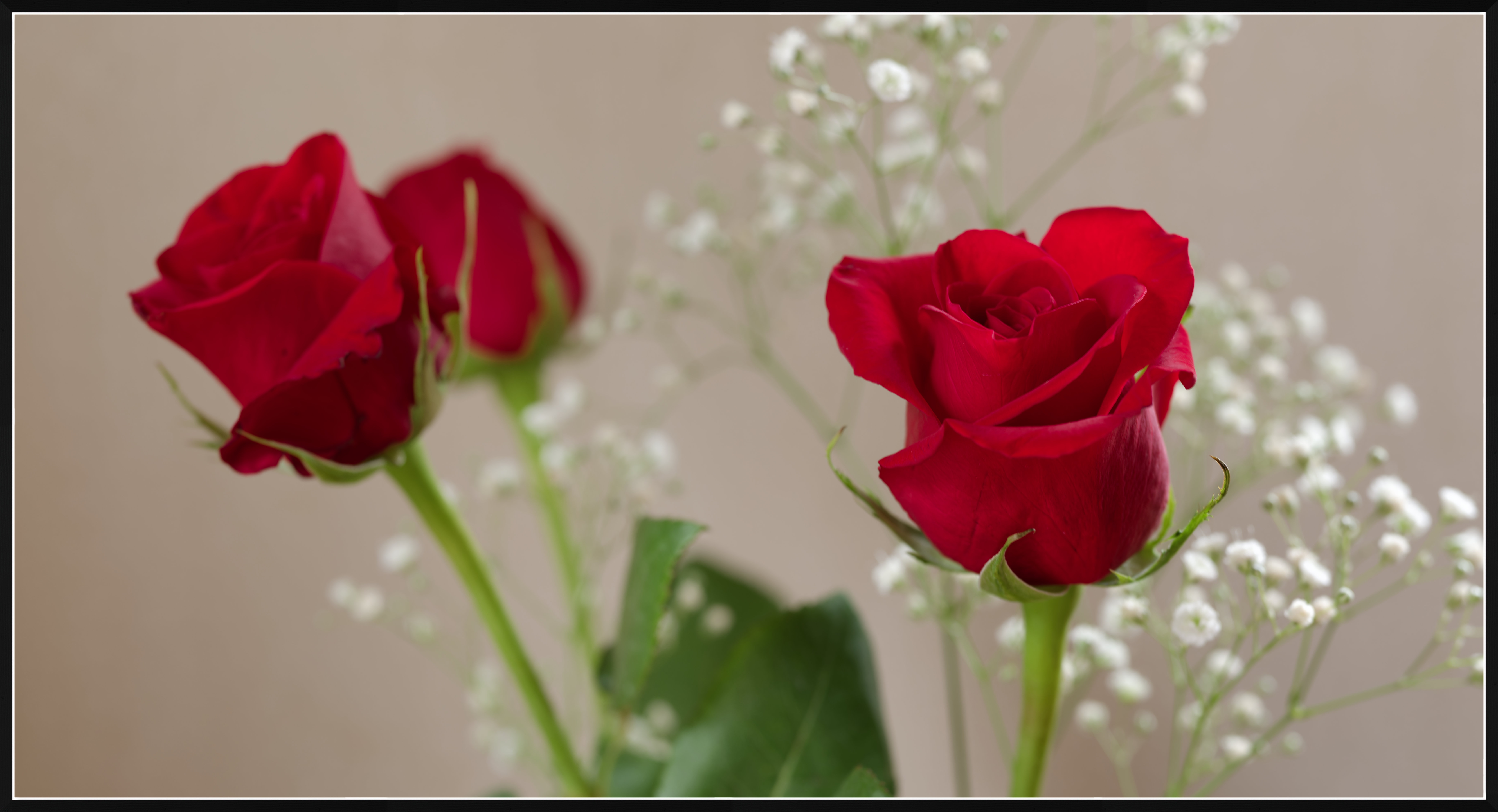
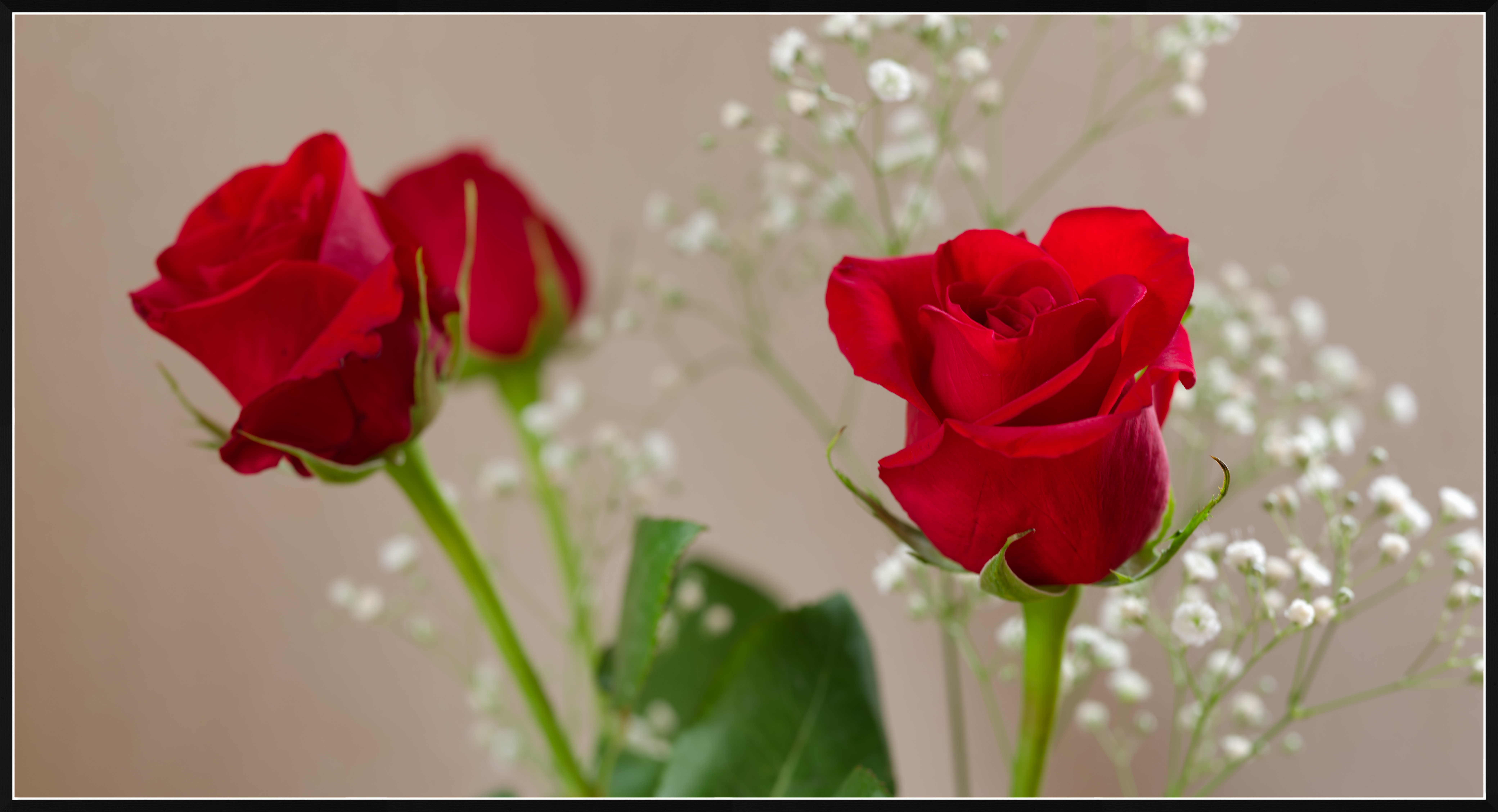
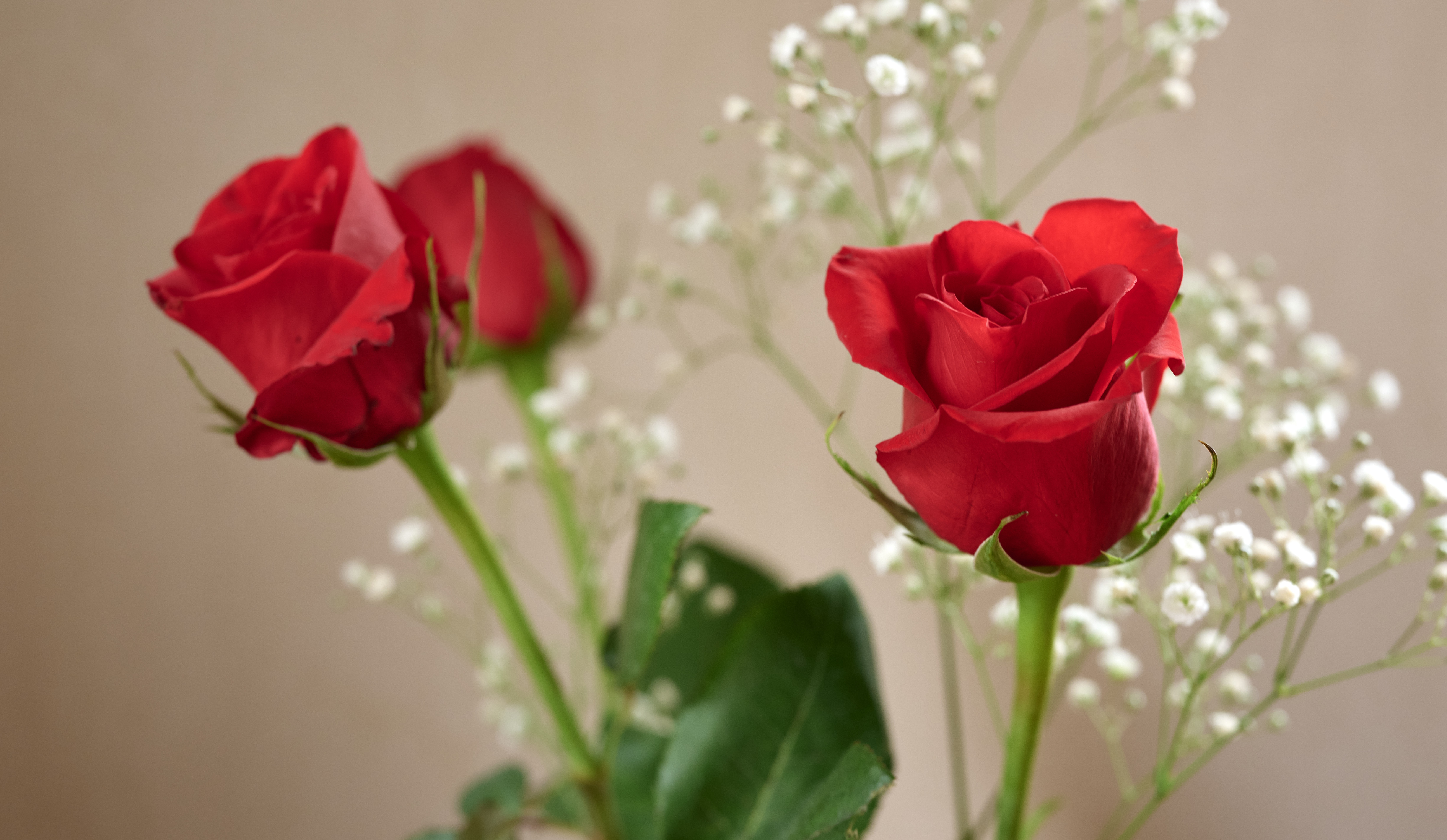
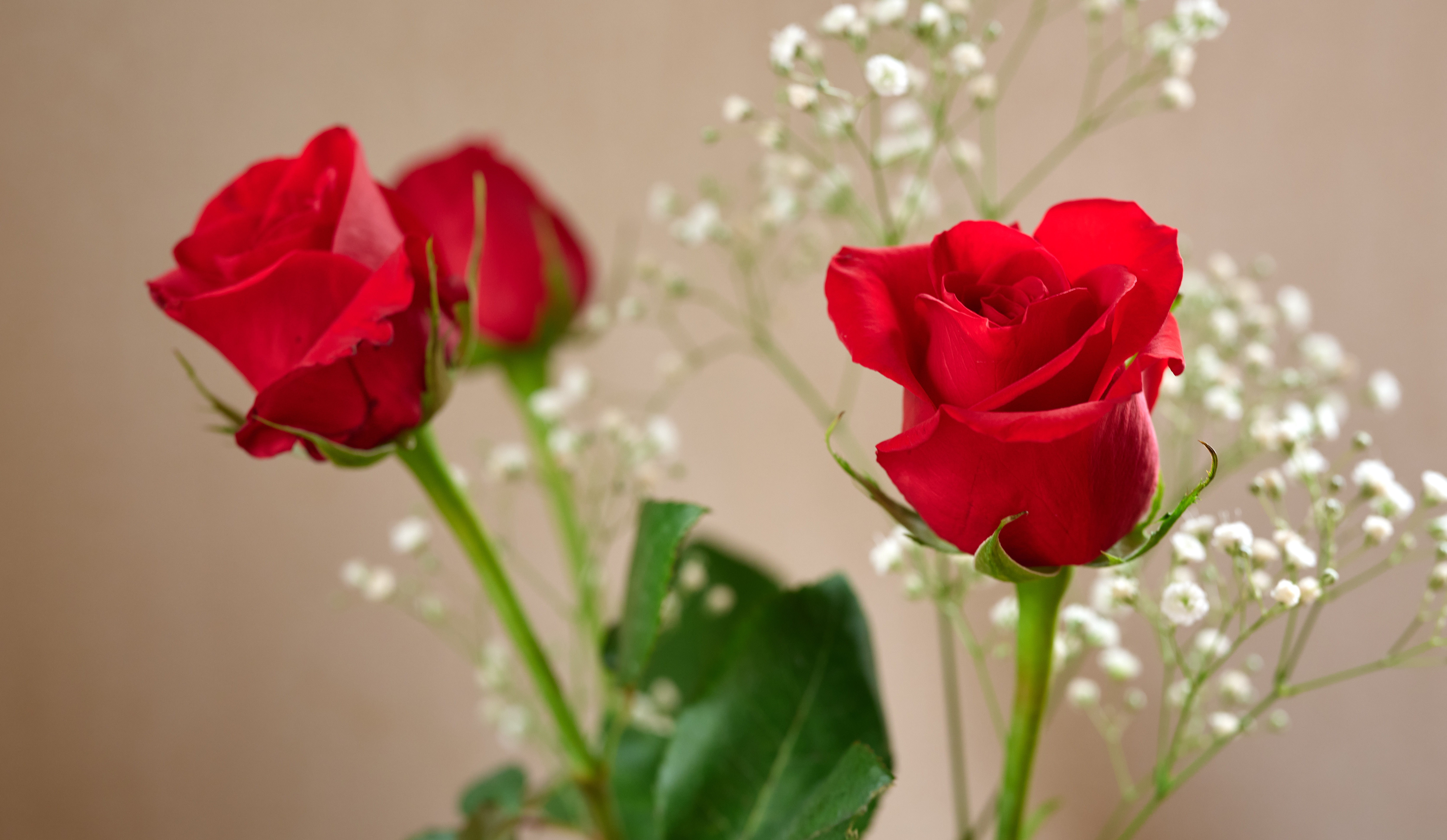
Yesterday, I bought these roses for my wife - killing two birds with one stone, so to speak - to make my wife happy on the one hand, and to have something to photograph on a gloomy day like today, on the other hand.

Below, I uploaded two pairs of jpegs.
In each pair,
the 1st jpeg was exported as Display P3, and
the 2nd was exported with the sRGB profile.

The first pair was exported from DxO Photolab 9.
The second pair was exported from Capture One.

There are some inevitable differences between Capture One and Photolab, because of the different color profiles.

The only argument in favour of using the smaller sRGB profile, where some of the visible vibrant colors are clipped and appear washed out, is that of the wide compatibility of sRGB.
I don't believe in this argument. In fact I believe that it is the Display P3 profile that is more broadly compatible with the modern devices. For example, all modern Apple devices support Display P3, and using sRGB instead means degrading the image quality for Mac and iPhone users. I use a MBP for photography, whereas my Windows laptop is for all work-related uses. Whereas I understand that not every Windows jpeg viewer or browser might be supporting Display P3, I have not seen a case when a jpeg exported with the Display P3 profile was displayed in Windows in a way that looked worse(!) than the same image exported as sRGB.

Thus, I am interested in the experience of FMers. Particularly, I wonder if you happen to see any detrimental effect of the Display P3 in your browser or jpeg viewer (feel free to download these images). That is if there is a browser or jpeg viewer where the sRGB jpegs display better image quality, and where the image quality of the Display P3 jpegs is degraded to make them look wrong or poor vs. the sRGB.


from Photolab 9 with Display P3


from Photolab 9 with sRGB


from Capture One with Display P3


from Capture One with sRGB


Mar 22, 2026 at 01:34 PM


Search in Used Dept. 

John Wheeler
Offline
• • •
Upload & Sell: Off
p.2 #11 · Color discrepancies from Lightroom to Flickr, Imgur, Windows Photos, firefox, and chrome/brave browsers.


ruthenium wrote:
Yesterday, I bought these roses for my wife - killing two birds with one stone, so to speak - to make my wife happy on the one hand, and to have something to photograph on a gloomy day like today, on the other hand.

Below, I uploaded two pairs of jpegs.
In each pair,
the 1st jpeg was exported as Display P3, and
the 2nd was exported with the sRGB profile.

The first pair was exported from DxO Photolab 9.
The second pair was exported from Capture One.

There are some inevitable differences between Capture One and Photolab, because of the different color profiles.

The
...Show more

Hi @ruthenium


As an interesting twist, your middle image from Photolab 9 is created using sRGB color numbers but does not contain the sRGB profile. It is my understanding that Photolab does not embed the sRGB profile (it embeds all other profiles) because, as the industry-standard default, embedding the sRGB profile is unnecessary. I am unaware of an option to force Photolab to embed the sRGB profile. I don't use Photolab, so this is just my understanding.

As such, if I have Photoshop Color Settings set to Working Space of P3, and the management policy to convert incoming images to P3 (the working space), what actually happens is that it leaves the image as Unmanaged, so the sRGB image is displayed, assuming the color numbers are in the P3 space.

Following is the Color Settings for Photoshop:


Viewing the image in Photoshop with those Color Settings and the image is oversaturated:


If I force the sRGB profile to be embedded, then you get this image:


I know this does not provide and answer to have an image in P3 and does it cause a problem, yet this helps demonstrate the problem you can have it the profile is not embedded

John Wheeler


Mar 22, 2026 at 03:50 PM
ruthenium
Offline
• • • •
Upload & Sell: On
p.2 #12 · Color discrepancies from Lightroom to Flickr, Imgur, Windows Photos, firefox, and chrome/brave browsers.


John, I cannot comment on the behaviour you see in Photoshop.
My default RGB image (jpg, tif) viewer is ApolloOne.
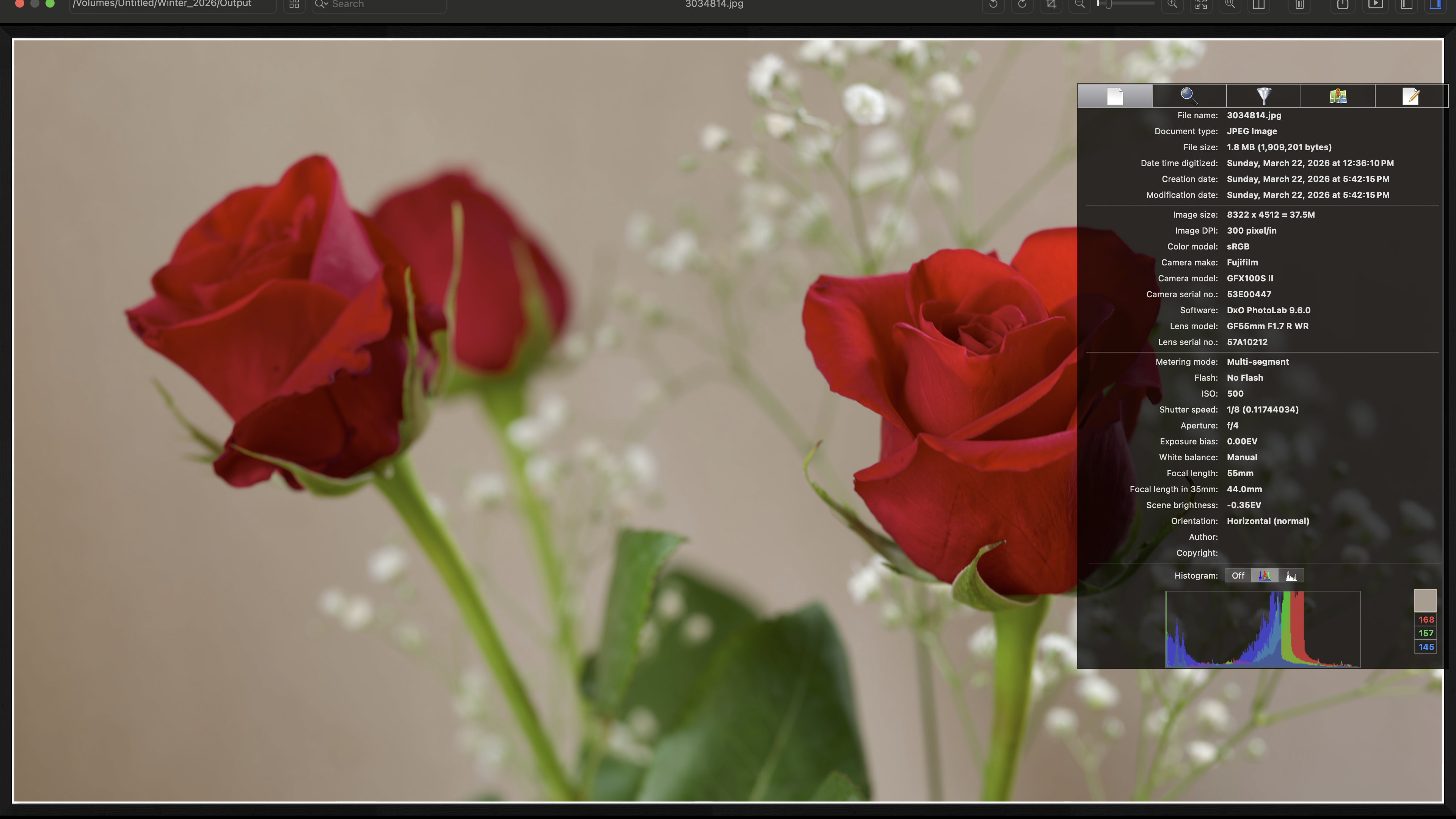
To examine the problem that you mentioned, I downloaded (from this thread) the sRGB jpeg that I posted earlier - the one exported from DxO Photolab 9.
When viewed in ApolloOne, I see all image information retained, including Color Model: sRGB.
I uploaded the screen shot from my MacBookPro.
Dmitri


Mar 22, 2026 at 05:00 PM
dclark
Offline
• • • • •
Upload & Sell: On
p.2 #13 · Color discrepancies from Lightroom to Flickr, Imgur, Windows Photos, firefox, and chrome/brave browsers.


It appears to me that both of the sRGB images, when downloaded by right clicking, do not have embedded profiles. Both of the P3 downloaded images do have embedded profiles. The best way to see if there is an embedded profile is to turn on the checkbox in PS "Missing Profiles -- Ask When Opening". For both of the sRGB files PS asked and I selected open with sRGB. For both of the P3 files PS did not ask and opened the files. Then all the files look good in PS with the P3 files somewhat more saturated. Same on the FM site.

It is not clear whether PL9 and C1 are not embedding sRGB profiles in files you export from those apps, but you can use the method above to check the files with PS. I would be shocked if they are not embedding profiles. As I stated in a prior post in this thread, LrC will not export a file without an embedded profile and any app that allows that is IMO a problem.


Mar 22, 2026 at 08:02 PM
John Wheeler
Offline
• • •
Upload & Sell: Off
p.2 #14 · Color discrepancies from Lightroom to Flickr, Imgur, Windows Photos, firefox, and chrome/brave browsers.


dclark wrote:
It appears to me that both of the sRGB images, when downloaded by right clicking, do not have embedded profiles. Both of the P3 downloaded images do have embedded profiles. The best way to see if there is an embedded profile is to turn on the checkbox in PS "Missing Profiles -- Ask When Opening". For both of the sRGB files PS asked and I selected open with sRGB. For both of the P3 files PS did not ask and opened the files. Then all the files look good in PS with the P3 files somewhat more saturated. Same on
...Show more

HI @ruthenium and
@dclark

There are a couple different ways to download images from FM yet for hte sRGB image, I too did not get an embedded profile. I also did not get a lot of the metadata that you show on your image.

Somewhere in the pipeline it got stripped out. Here is the full list of metadata using the EXIF tool from the file downloaded form FM:
(base) JKW-MB-Pro-2021:~ johnwheeler$ exiftool /Users/johnwheeler/Downloads/3034814.jpg
ExifTool Version Number : 13.44
File Name : 3034814.jpg
Directory : /Users/johnwheeler/Downloads
File Size : 1364 kB
File Modification Date/Time : 2026:03:22 17:51:35-06:00
File Access Date/Time : 2026:03:22 21:46:40-06:00
File Inode Change Date/Time : 2026:03:22 21:46:40-06:00
File Permissions : -rw-r--r--
File Type : JPEG
File Type Extension : jpg
MIME Type : image/jpeg
Exif Byte Order : Little-endian (Intel, II)
Orientation : Horizontal (normal)
Copyright :
Image Width : 8322
Image Height : 4512
Encoding Process : Progressive DCT, Huffman coding
Bits Per Sample : 8
Color Components : 3
Y Cb Cr Sub Sampling : YCbCr4:4:4 (1 1)
Image Size : 8322x4512
Megapixels : 37.5

-------------------------------------

It may not be your exporting application, yet it could also be the FM forum itself. The root cause could be traced, yet it is an example that you cannot count on all applications and viewers to behave well in color management. If the sRGB profile information and/or tag is stripped out, and the application still assumes the image is in sRGB, it does not directly cause an issue if the assumed sRGB information is used and then the system converts it to the monitor's profile. That is not the case for all applications.

Part of the pipeline is what happens to the color profile when downloaded with the viewer (I am using Chrome).

John Wheeler

It would be ineresting to know where the profile information got dropped in the pipeline.
John Wheeler


Mar 22, 2026 at 11:08 PM
ruthenium
Offline
• • • •
Upload & Sell: On
p.2 #15 · Color discrepancies from Lightroom to Flickr, Imgur, Windows Photos, firefox, and chrome/brave browsers.


This can be irrelevant, yet I wonder if "Download" can be different from "Save as"?
I used "Save as" in Safari to save the file from FM on my MBP.
I have both a Mac and a Windows laptop. I shall look into any differences between the two in how they handle downloads from FM. I can also look at the metadata with exiftool.
I believe the right way to get the information is either with
exiftool -ColorSpace -ICC_Profile:ProfileDescription image.jpg
or
exiftool -icc_profile:all file.jpg

Correct me if I am wrong.


Mar 23, 2026 at 06:28 AM
gdanmitchell
Offline
• • • • • • •
Upload & Sell: Off
p.2 #16 · Color discrepancies from Lightroom to Flickr, Imgur, Windows Photos, firefox, and chrome/brave browsers.


John Wheeler wrote:
HI @ruthenium@ and
@dclark@

There are a couple different ways to download images from FM yet for hte sRGB image, I too did not get an embedded profile. I also did not get a lot of the metadata that you show on your image.

Somewhere in the pipeline it got stripped out. Here is the full list of metadata using the EXIF tool from the file downloaded form FM:
(base) JKW-MB-Pro-2021:~ johnwheeler$ exiftool /Users/johnwheeler/Downloads/3034814.jpg
ExifTool Version Number : 13.44
File Name : 3034814.jpg
Directory : /Users/johnwheeler/Downloads
File Size :
...Show more

I think that some of this suggests why most people recommend using the sRGB colorspace — despite it being more limited than P3 — for web images where consistency is important.

We know what the sRBG image is going to look like in virtually any only presentation, regardless of what browser or platform is used. What you see in our browser is (apart from user’s differently calibrated or non-calibrated screens) is what your viewers will see.

So, two imperatives are in conflict here.

One imperative is the prospect of a somewhat larger color space (mostly extending to the green tones, by the way). The other imperative is making it more likely that viewers see the image as you saw it when you prepared a version for upload.


Mar 23, 2026 at 10:45 AM
dclark
Offline
• • • • •
Upload & Sell: On
p.2 #17 · Color discrepancies from Lightroom to Flickr, Imgur, Windows Photos, firefox, and chrome/brave browsers.


ruthenium wrote:
This can be irrelevant, yet I wonder if "Download" can be different from "Save as"?
I used "Save as" in Safari to save the file from FM on my MBP.
I have both a Mac and a Windows laptop. I shall look into any differences between the two in how they handle downloads from FM. I can also look at the metadata with exiftool.
I believe the right way to get the information is either with
exiftool -ColorSpace -ICC_Profile:ProfileDescription image.jpg
or
exiftool -icc_profile:all file.jpg

Correct me if I am wrong.


Your comment is confusing to me.
I believe the most reliable way to get the file that is being displayed is to look at the HTML that is being sent to the browser. In Firefox I do that by right clicking the image and using "Inspect". That shows me the HTML around the link to the image file, including the URL where the image file that is being displayed is located. I copy that URL and then open a tab and go to that URL where I see the image and can download it. I then load that file into PS to see if it has an embedded profile.

That is the process I used to see that of the four photos of the roses you posted the two P3 images have embedded profiles and the two sRGB images do not.

That means that all popular browsers will properly manage color for the P3 files, and how they handle color management for the sRGB files depends on the browser and how it is set up. As stated earlier, Firefox in its default set up sends files with no embedded profile to the display without color management which produces a result that is hard to predict. If the user has changed the default set up to select full color management Firefox will assign a sRGB profile to any files without an embedded profile. In this case where the sRGB profile is not embedded that will produce the desired result.

Why the sRGB profile is not present in those two files is not certain to me. It could be that PL9 and C1 are not embedding sRGB profiles, or it could be that the FM web site is removing them. You should be able to test PL9 and C1. I may upload an a photo that I know has an embedded sRGB profile to the FM site and see whether the embedded profile survives.


Mar 23, 2026 at 11:50 AM
dclark
Offline
• • • • •
Upload & Sell: On
p.2 #18 · Color discrepancies from Lightroom to Flickr, Imgur, Windows Photos, firefox, and chrome/brave browsers.


gdanmitchell wrote:
I think that some of this suggests why most people recommend using the sRGB colorspace — despite it being more limited than P3 — for web images where consistency is important.

We know what the sRBG image is going to look like in virtually any only presentation, regardless of what browser or platform is used. What you see in our browser is (apart from user’s differently calibrated or non-calibrated screens) is what your viewers will see.

So, two imperatives are in conflict here.

One imperative is the prospect of a somewhat larger color space (mostly extending to the green tones, by the
...Show more

In the case of the rose photos above, the photos with the P3 profile embedded will be properly displayed by all popular browsers. The sRGB images will depend on the browser and how it is set up.


Mar 23, 2026 at 12:01 PM
dclark
Offline
• • • • •
Upload & Sell: On
p.2 #19 · Color discrepancies from Lightroom to Flickr, Imgur, Windows Photos, firefox, and chrome/brave browsers.


These image files were Exported from LrC and had embedded color profiles.
When I examine these files as presented to the browser on this web site, they all have embedded profiles, including the sRGB file.


sRGB embedded profile


Adobe RGB embedded profile


Display P3 embedded profile


Mar 23, 2026 at 12:30 PM
BigBabyMoses06
Offline
• •
Upload & Sell: On
p.2 #20 · Color discrepancies from Lightroom to Flickr, Imgur, Windows Photos, firefox, and chrome/brave browsers.


I appreciate my issues have spurred on so much conversation. Very cool! Here are some findings from today after testing with 3 browsers… I was pretty much set on exporting to P3 at this point, but decided to play around with a few more images to make sure. I ran into a very weird and confusing problem today.

New testing with Firefox, Brave, Chrome, and Edge. Testing with blue WRX image.


1) Imgur on all browsers: Display P3 image now appears slightly washed out, less saturated. sRGB image on my computer looks better than the Imgur D-P3 image. sRGB upload displays much closer to Display P3 images as exported and displayed on my computer. This is weird.


2) Flickr on chrome, brave, and edge: Both images indistinguishable from each other, most like the sRGB images as displayed on my computer.

3) Flickr on Firefox displays more accurately, but it's different from image to image.


4) This is where it gets really weird. I went back to look at my IMGUR testing a few days ago, and they have not changed. The images appear proper as they did when exported on my computer. Because of this, I re-uploaded 2 of those original testing images (Yellow S2000) from a few days ago to Imgur in a new post, and now they suffer from the same issues I mentioned above in part 1 on all browsers! I tested this twice, same conclusion. As far as I can tell, I have not made any errors in my testing.

Display P3 IMGUR uploaded today


Display P3 IMGUR uploaded a few days ago


(have to cut/paste links for whatever reason)
Imgur (Today): https://imgur.com/a/mxLwjri
Flickr: https://www.flickr.com/photos/201071022@N07/55164094096/in/photostream/
Imgur (few days ago): https://imgur.com/a/fBd9zOH

I need a nap.


Mar 23, 2026 at 12:57 PM
1              3       4       end


FM Forums | Post-processing & Printing | Join Upload & Sell

1              3       4       end


You are not logged in. Login or Register