Notice: Undefined index: Bumped in /var/www/vhosts/fredmiranda.com/httpdocs/forum/functions_2021_i.php on line 1850
Notice: Undefined index: SecondBoardID in /var/www/vhosts/fredmiranda.com/httpdocs/forum/functions_2021_i.php on line 1851
Notice: Undefined index: LatestPoster in /var/www/vhosts/fredmiranda.com/httpdocs/forum/functions_2021_i.php on line 1852 Landscape Photographer - Photography - FM Forums
Congratulations to Steve Perry for winning Feature Thread of the Week with 4 votes - View Previous Winners
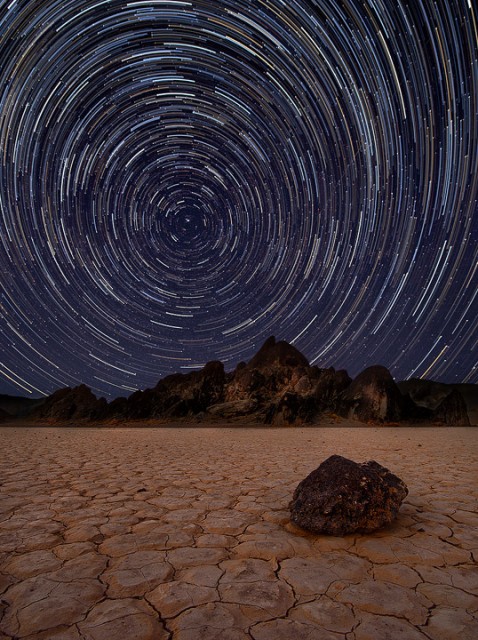
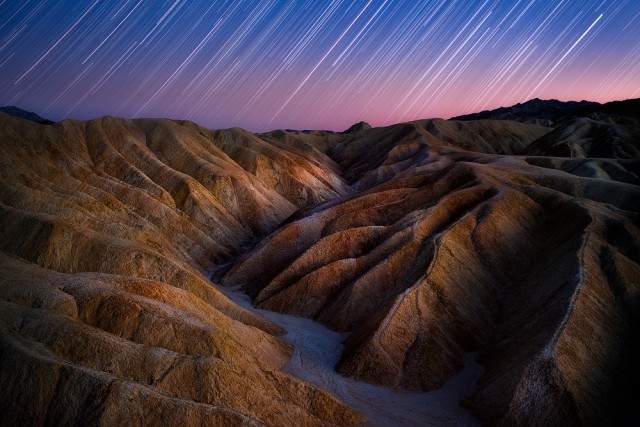
I wanted to post of a couple of my star trail images, both from Death Valley. They were both done using 100+ consecutive 30 second exposures. The first was out at the Race Track, the second at Zabriskie Point (and that one got published in the July issue of Outdoor Photographer last year ).
I've also put together a "How To" video that gives you the basics of both photographing and post processing star trail photos. Probably nothing new for those who have done star trails before, but I think it's a nice guide for beginners. That can be found here:
Looks like you took my Youtube comment seriously! Or maybe this was your plan all along Nice images Steve! The bottom one has been my all time favourite star trail image since I first saw it on your website.
Thanks Sashi - I'm glad you liked the video - Lots of work into that thing!
Justin - I did take your comment seriously. I had thought about posting it here, but wasn't sure if anyone would be interested. Your comment changed my mind - Thanks!!
Very nice compositions, lighting, colors, and DOF. Your star-trails look thicker than those taken by others--especially above Polaris at the Race Track. Is this like the super-moon? At the time you took the the photos, was the Universe closer to the Earth?
Jul 23, 2013 at 05:54 PM
Charlie Shugart Offline • • • • • • • Upload & Sell: Off
Steve,
I'm not a star trails kind of guy- so all I can offer are my reactions.
The first image is a bit too busy for me, i.e. too much stuff and not enough sky .
But the second shot is truly remarkable! I've never seen a better star trails image- probably never seen one anywhere near this good .
Wonderful!
Charlie
The second picture is especially nice. The first pic made me a little dizzy, but the second is superb! Beautiful colors and great composition. Nice job.
2 very cool shots here, they really like sweet. And also, nice work with your video. I can't believe your talked that long without pausing! It's a great tutorial on how to shoot star trails.
Jim
Jul 23, 2013 at 07:08 PM
Notice: Undefined index: adsensetopicmiddle in /var/www/vhosts/fredmiranda.com/httpdocs/forum/viewtopic.php on line 1500
Thanks so much to everyone for the kind words and the feedback It really means a lot to me.
@jdc562 - Thanks - Not sure why the trails seem thicker than others, kind of scratching my head on that one - maybe my location had better clarity than some others?? Hmm...
Thanks Charlie, G-ManWV, & Bjadelberg!
@Jim - I actually write a script and use an iPad teleprompter app for the video. I'd "umm" and "ahh" like crazy otherwise. The post processing part was without the TP though - I'm not coordinated enough to pull that off
@rhee- Thanks - I'll slow down in future vids. I had a lot to get in and I wanted to keep the video as short as I could so it didn't ramble. I agree though - I think I talk a bit too fast in it.
@hk_mtbr, naturesmoments, Morris, and Jason - Thanks!!
@Jon - Thanks - and while I prefer StarStax, it's pretty easy in PS too. Here's how:
1. Load all your files into PS by going to the File Menu, Scripts, Load files into stack. A dialog box will pop up, just browse for all your star trail files and click Open - don't mess with anything else in the dialog.
2. PS will load all your files into a single image, but you'll only see the top layer. You'll need to select all the layers BUT the very bottom layer (click the top layer, hold SHIFT, click the SECOND layer from the bottom.
3. With the layers selected, change the layer blend mode to "Lighten" - instant star trails, but no good way to fill the tiny little gaps. Still works pretty good though.


 ).
). 
 Nice images Steve! The bottom one has been my all time favourite star trail image since I first saw it on your website.