Notice: Undefined index: Bumped in /var/www/vhosts/fredmiranda.com/httpdocs/forum/functions_2021_i.php on line 1850
Notice: Undefined index: SecondBoardID in /var/www/vhosts/fredmiranda.com/httpdocs/forum/functions_2021_i.php on line 1851
Notice: Undefined index: LatestPoster in /var/www/vhosts/fredmiranda.com/httpdocs/forum/functions_2021_i.php on line 1852 People Photography - Photography - FM Forums
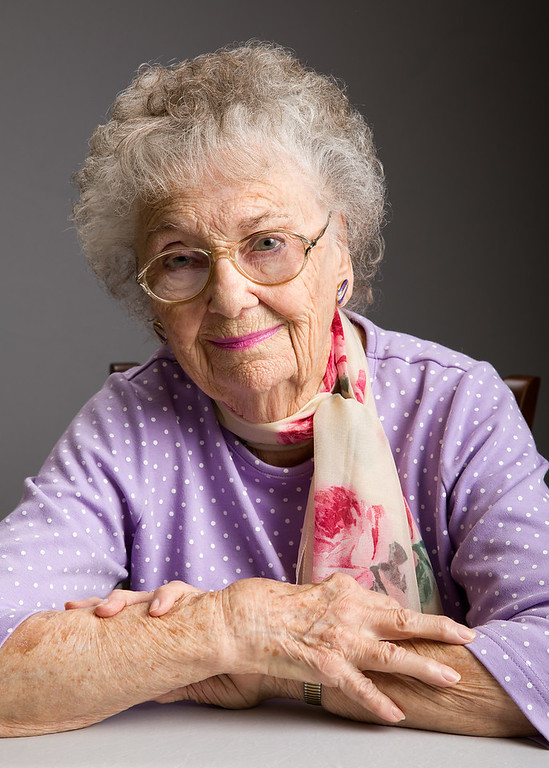
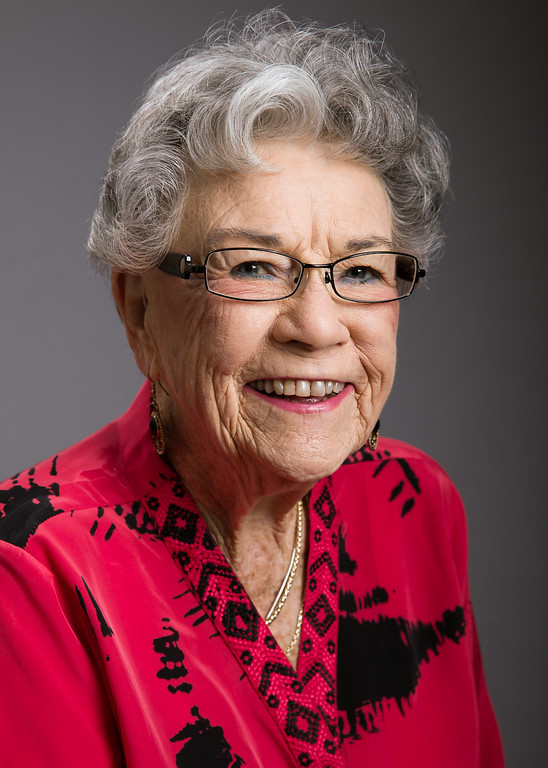
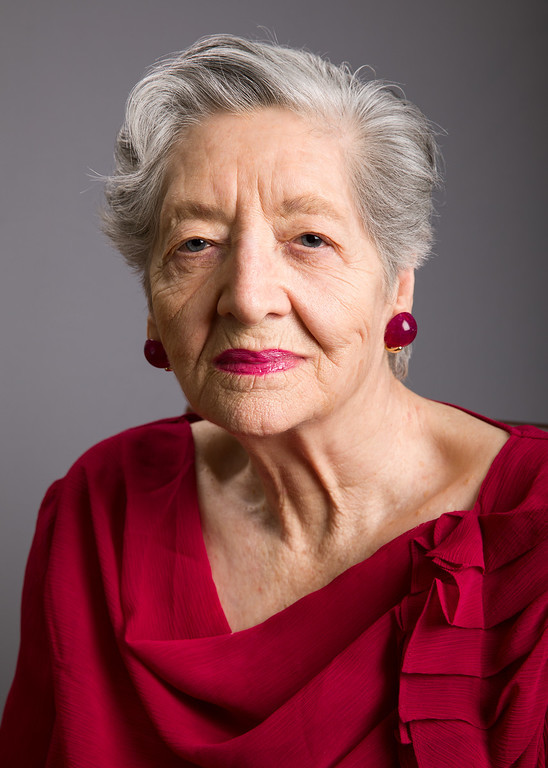
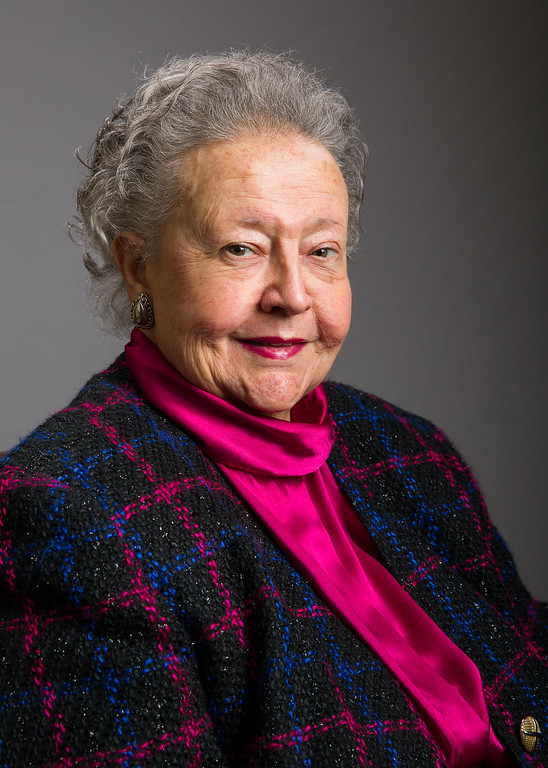
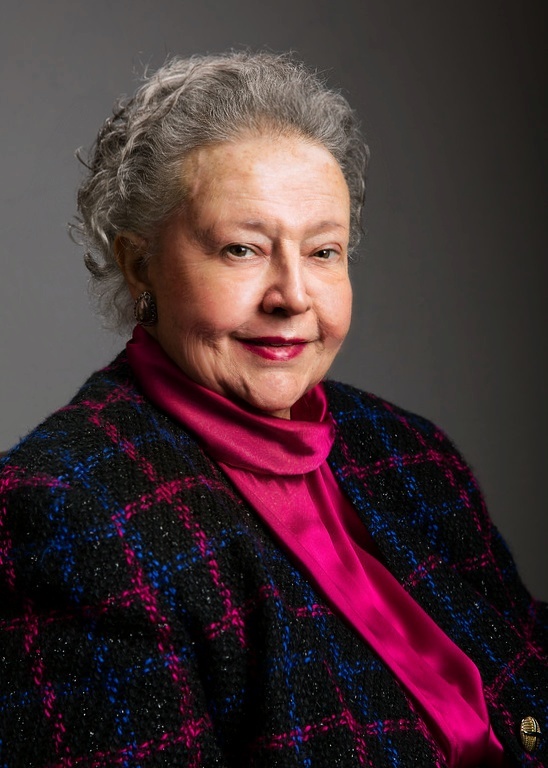
I'm looking for some feedback and ideas as very little can be found on the web for lighting and shooting seniors (the non high school kind). This year, I wanted to do a personal project with residents in senior living communities, providing portraits free of charge (it's only a hobby for me) to those who probably haven't had a portrait made in a long time. Saturday was my first opportunity.
Most who have critiqued my portrait work before said the lighting was too flat, so I tried to get more dimension in these. However, I feel like wrinkles might be over emphasized and am wondering if brighter shadows would be better. I would have preferred natural light, but this community didn't have a good source in a common area we could use. The setup was an Elinchrom 39" softbox feathered and just above eye level. There was a while reflector about 3-4" to the side pushing light back to the shadow side. High behind and off to the side was a strip box for a hair/accent light, which was a part of the setup I thought worked well.
I'm thinking next time I should have a larger white reflector much closer as I don't want to add a 3rd light (tight spaces). On some, I felt like the highlights were too specular despite feathering the main light. Any help or ideas from the more experienced are appreciated.
That's a great project and I think you're off to a good start. Maybe you could use a slightly lower ratio, but I wouldn't go too flat.
Helping a little in post wouldn't hurt. To me, the easiest way to help out is PortraitPro. You can dial it back and get more natural looking results. It's quick to use. You're after what they think they like, not what they look like.
I think these are pretty good overall. My belief is that you make your decisions on what you want to emphasize or de-emphasize. For older ladies, I'd usually prefer a flatter, softer light than for men. For men, depending on the look you want, you could go more directional and emphasize their "character". So it's not a one-size-fits-all situation.
One of the things you might want to consider in doing more of these is to capture them in their environment, depending on the nature and condition of their community. You can one-light them, with careful consideration to balance flash with available light.
Somewhat related to this is to emphasize expression over lighting strategy. Three of the four above have a relatively happy, upbeat expression. I like the first best, from this perspective. The third is a bit too stern, in my view, which might be different if it were a more casual set and shoot.
Nice job, though. Just a couple of things to think about.
Thanks for the comments and suggestions. Steve, I agree it should be more flat and need to experiment with the best way to do it. Maybe the main light less off to the side in addition to being feathered. I also noticed getting light into their eyes is more difficult than the younger folks I shoot, so I might need to bring it a touch lower.
Environment would be great, and I think it will take a community gaining comfort with me before they turn me loose in anything besides a small room for controlled shoots. I saw some ladies playing bridge and thought "what great shots I could get here." I'd also like to spend time learning their stories.
Steve, the third who wasn't smiling was actually a model in her younger days. She was very much into the serious look and didn't want to give me a smile. The second one was proud to tell me she was 95 years old (I could hardly believe it) and the fourth was celebrating her 90th birthday that day. I loved the first... such a sweet grandma. She came in knowing the specific pose she wanted.
Dmacmillan, I do need to figure out how to speed up post processing as it took the whole weekend to do 2-3 images for each of the 15 residents I photographed. I have another shoot (different community) scheduled for April 11th and hope what I learned in this one will help there.
What the d-man said about PortraitPro. It was made for this project. You'll likely find its default settings too heavy handed but once you have it dialed in you'll sail through the editing.
This is a highly subjective matter but I often find I prefer my portraits in this genre in black and white. Several things change as we age and one of them is skin tones that simply aren't youthful. Softening of lines (whether with flatter lighting, a slight blur via PP, or both) + less vivid (or no) color sometimes yields a truthful but more flattering image. YMMV.
I'd shoot two main lights, left and right of camera, 45 degrees at and down to subject. Third light can be hairlight or on background. That will soften the wrinkles.
Mar 15, 2017 at 12:51 PM
Notice: Undefined index: adsensetopicmiddle in /var/www/vhosts/fredmiranda.com/httpdocs/forum/viewtopic.php on line 1500
I'll take this down, but here's 5 minutes on Portrait Pro to give you an idea. Spend about 15 minutes on this image with a combination of PortraitPro and PS and you can soften it up even more.
nolaguy wrote:
This is a highly subjective matter but I often find I prefer my portraits in this genre in black and white. Several things change as we age and one of them is skin tones that simply aren't youthful.
Chuck
Chuck, I appreciate your kind words and encouragement. I had actually processed a version of each image in B&W because I am a fan. It's funny, my Mom says she doesn't want anything in black and white because that's all that was available when she was young, and now that we can have color, she wants color. I'm colorblind, which may be a reason I really like B&W.
---------------------------------------------
friscoron wrote:
I'd shoot two main lights, left and right of camera, 45 degrees at and down to subject. Third light can be hairlight or on background. That will soften the wrinkles.
Thanks, and I agree. I will try that with the next set, with brightness a couple stops less on the second light.
---------------------------------------------
dmacmillan wrote:
I'll take this down, but here's 5 minutes on Portrait Pro to give you an idea. Spend about 15 minutes on this image with a combination of PortraitPro and PS and you can soften it up even more.
I will download a trial version and give it a go. I had Portrait Pro a few years ago (version 8 or 9) and hated it. Everything seemed so fake. I'm sure it's gotten better over the years. Anything to cut down the post-processing time as it's my least favorite part.
Two stops down on the second light will be too much, in my opinion. For these ladies, I'd say a 2:1 ratio would be the max. A centered fill with a key just off axis, both at equal power, will give you that. But I suspect that Ron is suggesting two lights off-axis at equal power for a 1:1 ratio.
Steve is correct. The way to minimize wrinkles is to minimize shadows. You do that with the two lights at 1:1 ratio. That doesn't mean it's the right way to shoot your series. It's just the way I would do it if I wanted to minimize wrinkles. Obviously, there are shots in which you want to emphasize wrinkles, and you would work your lighting to achieve that. But in this case, it seems softening the wrinkles is the way to go (for me).
As for Portrait Pro, for one they keep improving it with revisions. But the main thing to understand about Portrait Professional is that you have complete control over every single setting. If you just go with the default settings, yes, to me it looks fake and plastic. But once you take control of the settings, it can be a very powerful ally in your post-processing.
Hi Doug. One generality about posing these types of men and women's portraits is that you have the women's chest away from the key light and men's chest facing the key light. That generally makes women look slimmer and men more masculine unless you're shooting a 1:1 ratio. Not an absolute rule, but it works in many cases.
I also totally agree with Steve that a 2:1 is good because you want some dimentionality to the face while minimizing the skin issues.
This is a really good thing you're doing here, Doug!
A few thoughts to throw in the mix...
Short lighting vs. broad - different subjects will benefit from one over the other and you may want to experiment with that a bit, depending on how rushed you are (you're 50/50 in this set, but I don't know if you were consciously choosing one over the other).
You mentioned being interested in learning their stories - along with anything else you might have in mind, this may be a great way to get some of the other expressions you're looking for! Incorporating a couple of ideas, you might try setting up an off camera chair and begin having some of these conversations with them - while you're doing that you can use a remote to capture some great "camera unaware" portraits (easier with natural/continuous lighting, but still doable).
I get the impression from your 1st post that you're creating these portraits primarily for the subjects themselves, which is great. As far as retouching though, I'd definitely keep in mind that these portraits will be very special for their family and friends as well; many (hopefully all!) of whom will appreciate a natural well done portrait of them looking like themselves, at this age, wrinkles and all.
I also encourage you to incorporate environmental portraits as well - both in their own environments as well as outside in natural light.
This is a precious priceless gift you're offering. Keep it up!



 I'm colorblind, which may be a reason I really like B&W.