p.3 #1 · Thypoch Simera 28mm 1.4 Z mount - images & discussion
Keith B. wrote:
Zeiss ZF have no contacts and therefore cannot transmit aperture data to the body, just like any unchipped lens.
It's true for MILC and FTZ. However, when you enter focal length and max aperture in the menu of DSLR, you get the aperture in EXIF data, for every shot.
Therefore, the problem is the FTZ and the lack of aperture simulator ring in Z bodies. It's rather schizofrenic for a manufacturer making old fashion, vintage look, bodies (Zf, Zfc). I can read the set aperture of my Nikkor AI 50/1.4 on D780, but not on Zf
p.3 #2 · Thypoch Simera 28mm 1.4 Z mount - images & discussion
Keith B. wrote:
Zeiss ZF have no contacts and therefore cannot transmit aperture data to the body, just like any unchipped lens. ZF.2 can relay the data, but you HAVE TO control the aperture from the body. With the current Simera 28/1.4, if you enter "28mm f/1.4" into the Non-Cpu Lens index on the camera, the EXIF will show 28mm, f/1.4 on every shot.** At least you will know which lens you used.
**Note: Lightroom Classic shows "28mm f/1.4" on the file info, so I assume it's in the EXIF for the file.
I did enter the Simera in the Non-CPU Index and selected it. Capture ONE shows nothing in the EXIF, not the focal length, not the aperture, not the working aperture for the SImera. This is on Z7, latest firmware.
It does show focal lenght and aperture for all my ZF lenses (on FTZ I) which I also have listed in the NonCPU Index, and with ZF lenses I can even control the aperture with the aperture ring, which I prefer.
p.3 #4 · Thypoch Simera 28mm 1.4 Z mount - images & discussion
If you save/import to Apple Photos (or other) is any exif info there? (cross-check)
cyra wrote:
I did enter the Simera in the Non-CPU Index and selected it. Capture ONE shows nothing in the EXIF, not the focal length, not the aperture, not the working aperture for the SImera. This is on Z7, latest firmware.
It does show focal lenght and aperture for all my ZF lenses (on FTZ I) which I also have listed in the NonCPU Index, and with ZF lenses I can even control the aperture with the aperture ring, which I prefer.
p.3 #6 · Thypoch Simera 28mm 1.4 Z mount - images & discussion
cyra wrote:
Anyone shooting Simera 28mm on Z6 or Z7?
With non-CPU lenses/dumb adapters, my Z6 does not display any lens information, and this should also apply to all other Z Gen1 bodies (Z5, Z6, Z7).
While it is possible to set the focal length and maximum aperture under non CPU settings, thus enabling 3-axis IBIS for non CPU lenses (provided the appropriate setting/non CPU number is selected for the attached lens), the option to enter the lens name, as found on newer camera bodies, is missing.
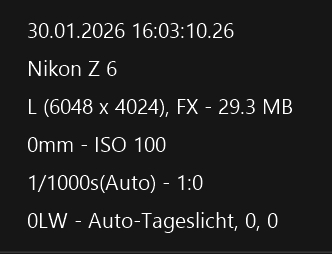
This is what NXStudio shows me on my Z6 when using a non-CPU lens, in this case the Thypoch 28/1.4 Z.
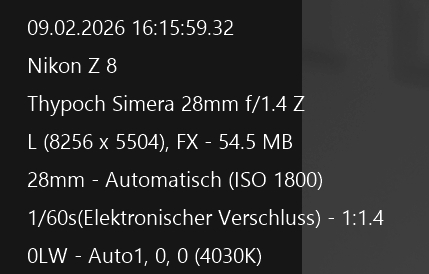
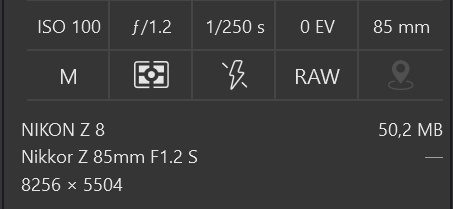
This is what it looks like with the Z8, also with the Thypoch 28/1.4 Z.
With Expeed7 bodies, there's an additional option to enter the lens name under non-CPU settings.
This name is then saved and recognized and displayed by programs like NXStudio, DXO, or LRC/PS.
However, the set aperture (working aperture) isn't displayed here either, which makes sense since there's no communication between the camera and the non-CPU lens.
The camera therefore does not know which aperture I have set on the lens for the photo, only what was entered under non CPU Settings.
What is displayed is the aperture assigned to the lens in the non-CPU settings, so always f/1.4 for the Simera 28mm, not the working aperture.
As far as I know, there’s a feature exclusive to the Zf that allows you to retroactively record the working aperture in the EXIF data using one of the control dials, even with a non-CPU or dumb adapted lens.
But Zf owners probably know more about that than I do.
I’ve only read about this feature, since I don’t own a Nikon Zf.
My Z8 doesn't have this feature.
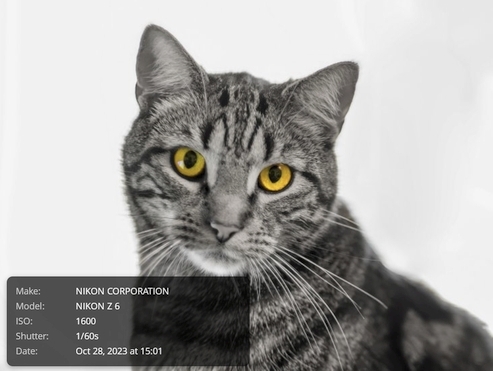
This is what it looks like for example, in the DPR forum.
Here's a shot with the Z6 and a Canon FD 85mm f/1.2 L lens.
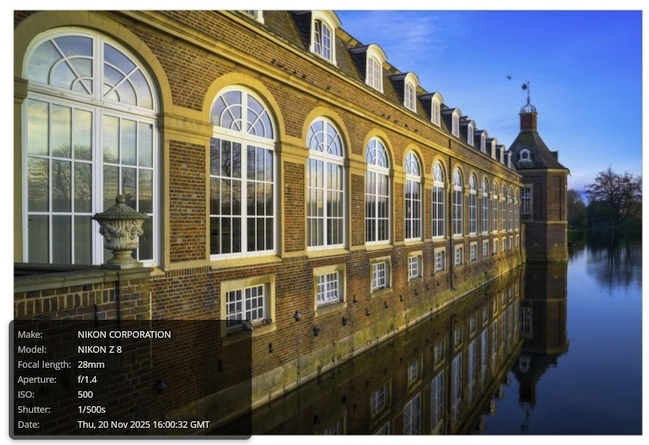
This is how it looks with the Z8, in this case with the Simera 28mm f/1.4 lens:
p.3 #7 · Thypoch Simera 28mm 1.4 Z mount - images & discussion
My Zf now allows me to "set" the aperture, spoofing it for EXIF. It's a pain to change it on the lens AND the command wheel, but it's possible. I'm guessing that's a fairly recent addition that hasn't made it every camera yet (my Z9 certainly doesn't have it).
p.3 #8 · Thypoch Simera 28mm 1.4 Z mount - images & discussion
I've added that to my post above.
As far as I know, though, that's exclusive to Zf, to retroactively record the working aperture in the EXIF data using one of the control dials, even with a non-CPU or dumb adapted lens.
p.3 #9 · Thypoch Simera 28mm 1.4 Z mount - images & discussion
RoamingScott wrote:
My Zf now allows me to "set" the aperture, spoofing it for EXIF. It's a pain to change it on the lens AND the command wheel, but it's possible. I'm guessing that's a fairly recent addition that hasn't made it every camera yet (my Z9 certainly doesn't have it).
interesting but cumbersome I guess. What about the Z5II, does anyone know?
p.3 #11 · Thypoch Simera 28mm 1.4 Z mount - images & discussion
Vento wrote:
I've added that to my post above.
As far as I know, though, that's exclusive to Zf, to retroactively record the working aperture in the EXIF data using one of the control dials, even with a non-CPU or dumb adapted lens.
It's not retroactive, it's pre-shutter release. You "set" the aperture on the camera itself, then take the photo, and the resulting EXIF is correct.
p.3 #13 · Thypoch Simera 28mm 1.4 Z mount - images & discussion
I tried it again.
Capture One:
on D750:
Zeiss ZF registered as nonCPU lens: focal length and widest aperture only.
Zeiss ZF.2: Exif says "ZEISS Planar 50/1.4 ZF2.", focal lenght and widest aperture AND set
aperture, you can operate the aperture on the lens or on the camera.
on Z7:
Zeiss ZF on FTZ registered as nonCPU lens: focal length and widest aperture but not the set
aperture
ZF.2 on FTZ, Exif says "50/1.4" , focal length, widest aperture and set aperture shown, you can
operate the aperture only on camera (on lens set to 22)
Thypoch Simera 28/1.4 registered as non CPU lens: NOTHING in the Exif
Nikon could do better, if they wanted. But I am also disappointed that the Simera doesn't show up. Interesting that it shows in the Exif with Z8.
p.3 #15 · Thypoch Simera 28mm 1.4 Z mount - images & discussion
This is solely due to the fact that on newer Z-series camera bodies, you can enter the lens name under the non-CPU settings.
Therefore, the lens doesn't communicate with the camera; with non-chipped lenses, there's absolutely no communication.
Consequently, you can only adjust the aperture on the lens, not on the camera.
The settings displayed are those you've entered for the lens under "non-CPU."
In my case, I have "Thypoch Simera 28mm f/1.4 Z" entered there. If I were to enter "Nikkor AF-S 28/1.4," it would display that, even though it would still be the Thypoch.
In DXO, this even leads to a curious situation.
When I import Z8 NEFs, shot with my Canon FD 85/1.2 L, into DXO, DXO 6 Elite interprets them as Z 85/1.2 S.
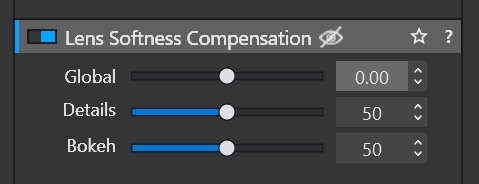
This is useful in that it provides access to the relatively powerful DxO tool, “Lens Softness Compensation.”
This is normally only available for body/lens combinations profiled by DxO.
The corrections, which are intended for the Z 85/1.2 S, can be disabled, but access to “Lens Softness Compensation” remains available for my Canon FD 85/1.2 L as well.
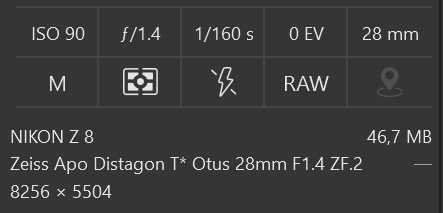
DXO incorrectly identifies my Thypoch 28/1.4 Z as a Zeiss Otus 28mm f/1.4 ZF.2.
That’s why I also enabled “Lens Softness Compensation” for the Thypoch in DXO.
Both lenses are correctly named/registered in my Z8: the Canon FD 85mm f/1.2 L and the Thypoch 28mm f/1.4 Z.
That’s actually pretty nice; as I said, you can disable the corrections, but “Lens Softness Compensation” remains active, which is very useful and powerful in certain situations.
DXO loads the profile for the Z8 and the Z 85/1.2 S, or for the Z8 and the Zeiss Otus 28/1.4, even though the files are shot with a unchipped Canon FD 85/1.2 L or a unchipped Thypoch 28/1.4 Z.
This doesn't work with the Z6, even though the respective profiles are available there as well.
This only works with my Z8 files.
With my Z6 NEF files; there, “Lens Softness Compensation” remains disabled with my Canon FD 85/1.2 L as well as the Thypoch 28/1.4 Z.
p.3 #16 · Thypoch Simera 28mm 1.4 Z mount - images & discussion
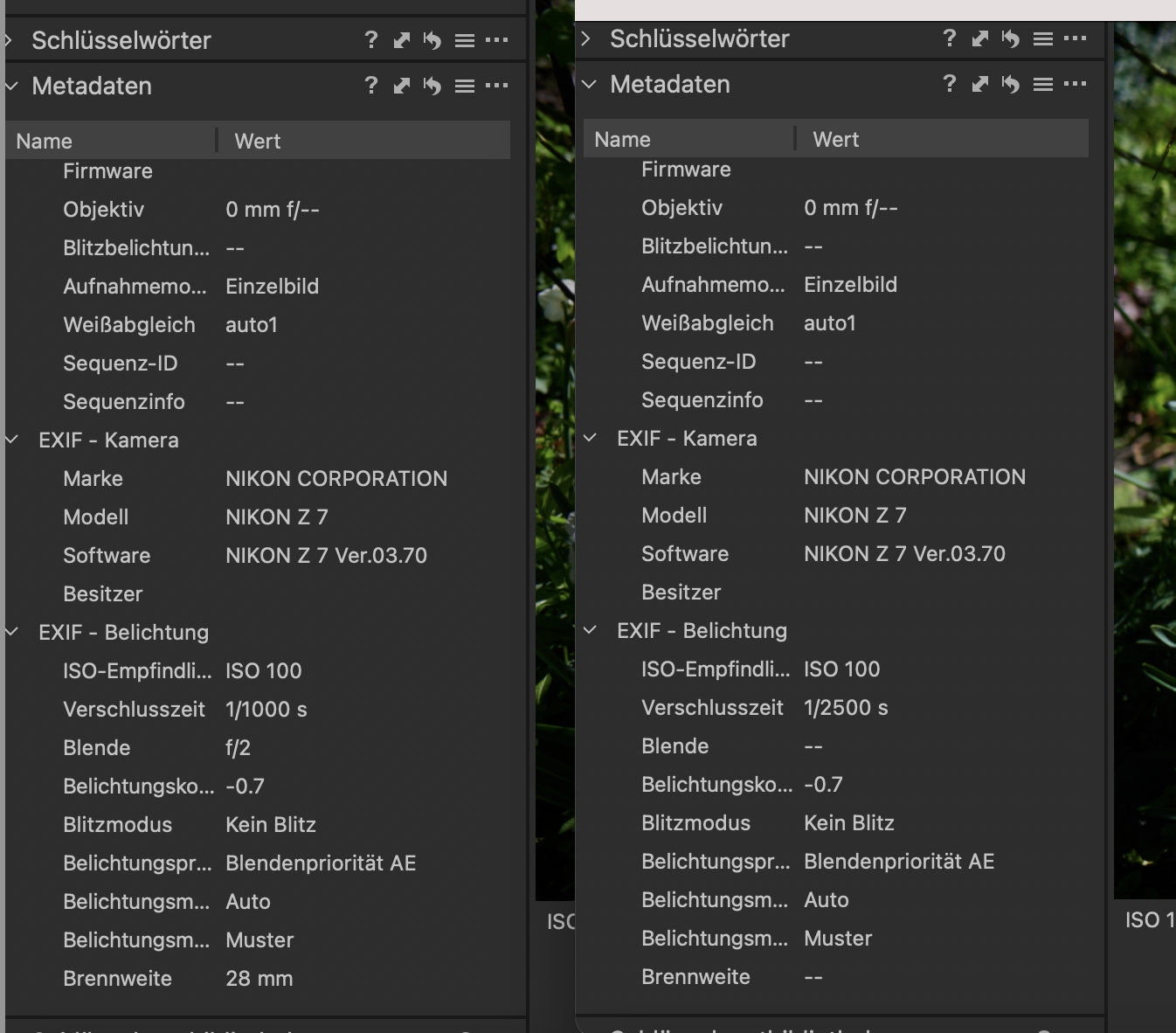
Thypoch Simera 28/1.4 on Z7 does not show any data in the exif (on the right) although set as nonCPU lens, whereas for the Zeiss ZF 28/2 on FTZ (also a nonCPU lens) (on the left) focal length (Brennweite) and largest aperture (Blende) is shown in the exif.
I don't understand this.
p.3 #17 · Thypoch Simera 28mm 1.4 Z mount - images & discussion
Vento wrote:
This is solely due to the fact that on newer Z-series camera bodies, you can enter the lens name under the non-CPU settings.
...
The settings displayed are those you've entered for the lens under "non-CPU."
In my case, I have "Thypoch Simera 28mm f/1.4 Z" entered there.
in my case Z7 can only remember the focal lenght and the widest apperture, there is no way to set a name, when you register the lens in the camera as a nonCPU lens.
The non CPU lens setting works fine for my ZF lenses, but not for the Simera. This is what I don't get. Somehow the set info of the nonCPU lens isn't transfered to the exif. See above.
p.3 #18 · Thypoch Simera 28mm 1.4 Z mount - images & discussion
The Simera behaves on my Z6 just like all my other non-CPU lenses when mounted with a dumb adapter.
Although the focal length and maximum aperture are listed under my “non-CPU settings,” neither the focal length nor the maximum aperture appears in the EXIF data.
I can’t say why this is different with your Zeiss ZF.
If it’s a ZF2, as described above, that makes sense because the ZF2 is a CPU-equipped lens, so the aperture can be adjusted on the camera, because the camera and ZF2 lens can communicate via FTZ, as the ZF2 version has a CPU and corresponding contacts.
If it’s the ZF version without a CPU, then it could be related to the FTZ, which, unlike the adapters I use for my vintage lenses, is not a simple dumb adapter.
I own more than a dozen non-CPU vintage lenses—M42, Canon FD, and Mamiya 645, and for none of these lenses do the focal length and/or maximum aperture appear in the EXIF data (regarding Z6 Gen1), even if they are entered under “non-CPU” and selected accordingly for the adapted lens.
So the Simera behaves here just like all my other non-CPU lenses, adapted via a “dumb” adapter.
p.3 #19 · Thypoch Simera 28mm 1.4 Z mount - images & discussion
well, I have the Z version of the Simera, so no adapter involved. It has no contacts, but I have set it als nonCPU lens. I have 6 ZF lenses and 3 ZF.2 lenses, I am well aware of the difference. I actually prefer the ZF because I can work the aperture on the lens, I don't get the set aperture in exif, but at least the focal lenght and widest aperture show in exif.
The FTZ has contacts, so it is not a dumb adapter - but the Zeiss ZF doesn't. So does the FTZ do some communication through its contacts? Maybe it just says "nonCPU lens here" and that makes the camera actually regard the nonCPU data for the Zeiss ZF I dialed in.
Just to summarize again: the Simera shows up in Exif with Z6II, Z7II, Z8, Z9 and ZF, - but not on Z7 and not on Z6.
What about Z6III and Z5II? Does anyone shoot with one of these bodys and Simera? Does the lens show in the Exif, when dialed in as nonCPU lens?
p.3 #20 · Thypoch Simera 28mm 1.4 Z mount - images & discussion
The fact that the Simera is a Z-mount version makes no difference here.
It behaves like any other non-CPU lens adapted via a dumb adapter.
It comes down to the same thing whether you use an dumb adapter from Mount X to Z-mount, or whether the appropriate mount is already integrated, as with the Simera.
Unlike with my Z6 Gen1, the focal length and maximum aperture are displayed in the EXIF data, as well as the lens name/designation, which can be entered under the non-CPU settings on a Z8, Z6III, or Z5II.
The Z6 III has been updated in this area with FW 2.00 by Nikon; accordingly, the information on the extended "non CPU Settings" (option to name the lens) can only be found in the FW 2.00 Abendum/manual and not in the original manual.
The option to enter the working aperture, as described by Scott, is currently exclusive to the Zf.
It's tedious, but at least it's a way to record the working aperture in the EXIF data.
This feature is not available on the Z5II, Z6III, or Z8.
However, for all three bodies, the values entered under "non-CPU Settings" for focal length and maximum aperture are displayed in the EXIF data.
Furthermore, with the current firmware, all three bodies have the option to name the non-CPU lens there, so that the entered lens name also appears in the EXIF data.
As you can see from the EXIF data of the images I linked in previous posts,
Z8 displays what I entered under "non CPU" for the Simera lens: 28mm f/1.4 and the name I entered, Thypoch Simera 28mm f/1.4 Z.
The Z6 Gen1 doesn't display anything there, despite entering the focal length/maximum aperture under non-CPU settings.
3-axis IBIS also works with the Z6 Gen1, but the data entered in the non-CPU settings isn't recorded/listed in the EXIF data.
Apart from that, the lens naming option does not exist under the non-CPU settings for Gen1 bodies.