Is anyone else having this issue with your Sony A7RVI and exporting files in Lightroom desktop on a mac?
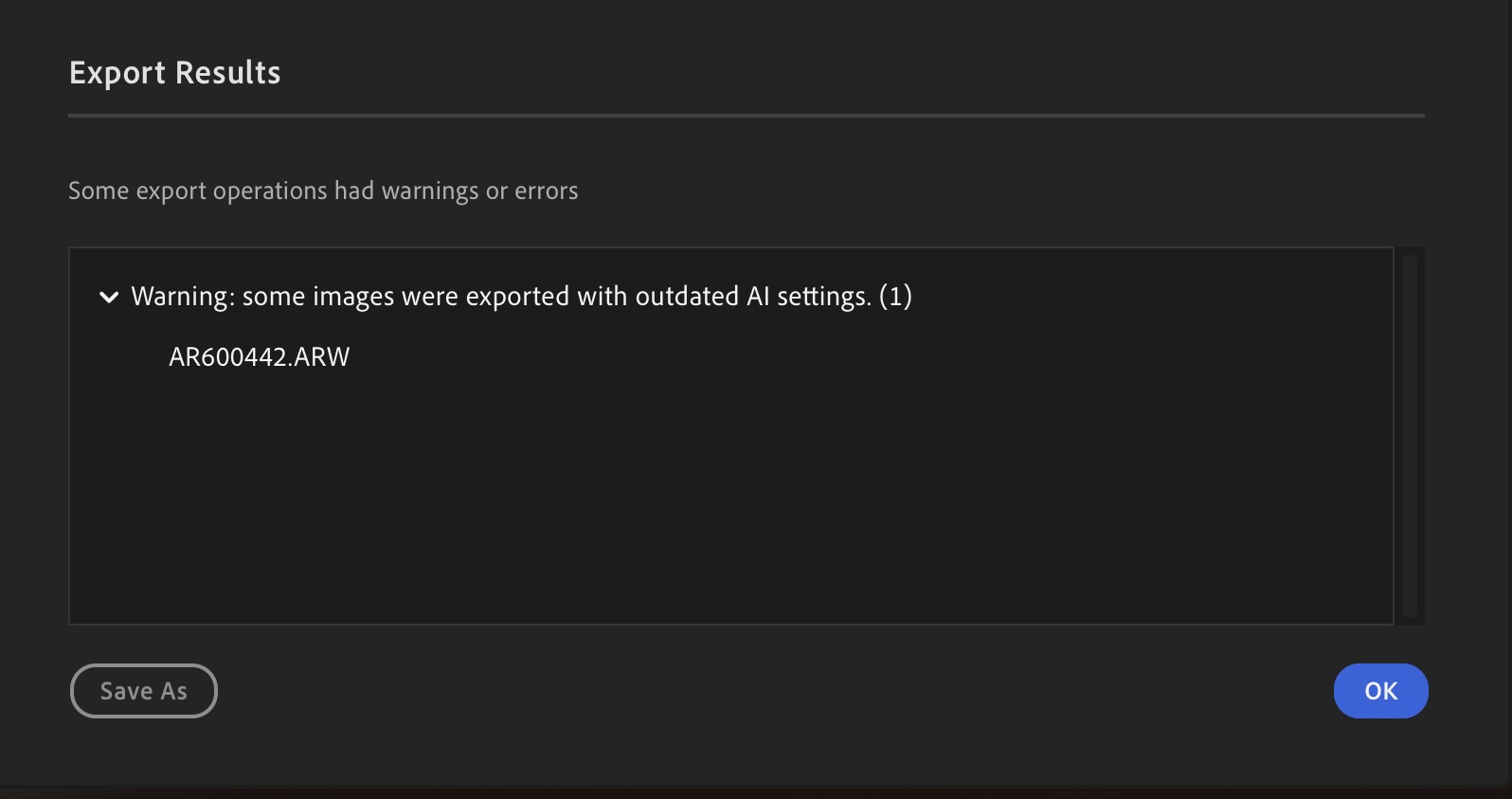
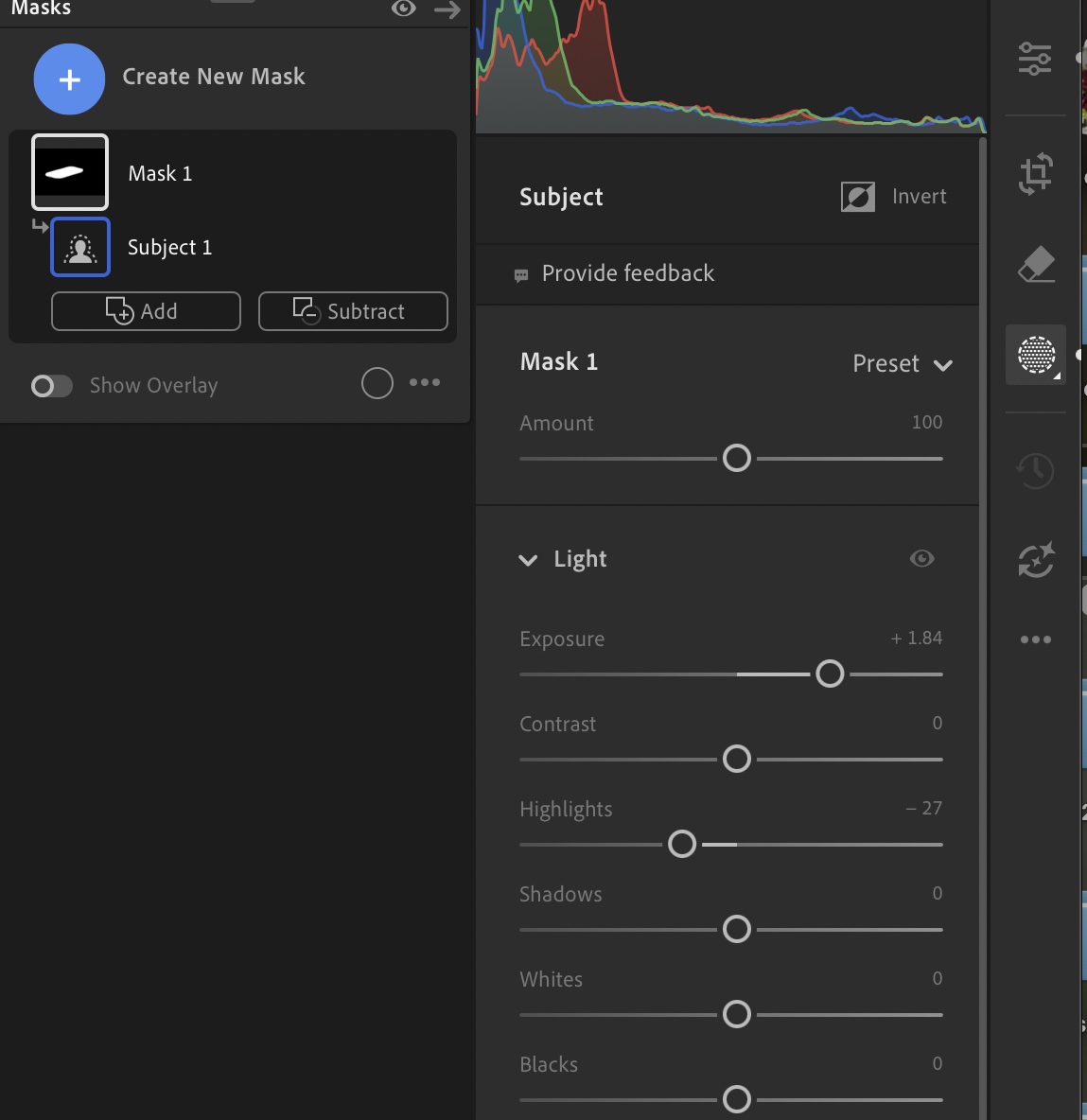
With the new Sony A7RVI, when I go to export raw photos with any mask, it provides the attached error message even though there are no AI edits to update as you can see by the no yellow icon. Seems to be triggered anytime you apply a mask to a file. Have tried the multiple file updating AI edits for all files and that does not work either. It doesn't do it with my other Sony and Nikon raw files. Have had others with Lightroom desktop try the same workflow and are receiving the same error, so there seems to be some raw file compatibility issue.
Would like to confirm with other A7RVI users also if they are experiencing this issue or not when editing their raw files with mask and exporting. Appreciate your input! Thank you.
I've had the A7RV since it came out and have loved it. It replaced the A7RIV primarily because of the automated focus stacking. I just got the A7RVI and while it's an amazing machine, it is somewhat tedious to set up. Maybe I don't remember what I went through to set up the A7RV.
I joined Mark Galer's Patreon and have his e-book and Camset. I really do not need quite so many sets of settings and I know I can use only what I want and or need but I find myself going through sooo many menus to set up "my menu" and the function menu that I may need to take a break for a couple of days. I'm sure I'll get it set and get used to it eventually but it seems a struggle.
I'm a mainly landscape/nature person who also does family events.
You are not alone. I'm thinking there's a market for someone reverse-engineering the format of Sony camset files and making a simple utility to transfer settings across cameras even if they're not the same model.
Although... to be perfecty honest, it took me less than 20 minutes to manually move all my settings from the A7RV to the A1 II and the same procedure can be repeated for the A7RVI:
- Put both cameras on a desk
- Replicate the i-menu by looking at the reference
- Replicate the home menu by looking at the reference
- Replicate the custom button assignment, again - looking at the reference
- Go through the rest of the shooting menus
I swear it took me less than 20 minutes. It is a very dumb "mechanical" exercise. But it takes much longer if the reference camera is not laying in front of you.
Jason29 wrote:
Is anyone else having this issue with your Sony A7RVI and exporting files in Lightroom desktop on a mac?
With the new Sony A7RVI, when I go to export raw photos with any mask, it provides the attached error message even though there are no AI edits to update as you can see by the no yellow icon. Seems to be triggered anytime you apply a mask to a file. Have tried the multiple file updating AI edits for all files and that does not work either. It doesn't do it with my other Sony and Nikon raw files. Have had others with Lightroom desktop try the same workflow and are receiving the same error, so there seems to be some raw file compatibility issue.
Would like to confirm with other A7RVI users also if they are experiencing this issue or not when editing their raw files with mask and exporting. Appreciate your input! Thank you. ...Show more →
I have exported several A7R6 images from LR where I used dodge & burn or sharpening masks, and sometimes Denoise, and have not had this error, though when exporting the same image again after further tweaking I have seen the dialogue box asking if I want to update AI changes and I OK that. I’m on a MacBook running Tahoe 26.5.1.
Jason29 wrote:
Is anyone else having this issue with your Sony A7RVI and exporting files in Lightroom desktop on a mac?
With the new Sony A7RVI, when I go to export raw photos with any mask, it provides the attached error message even though there are no AI edits to update as you can see by the no yellow icon. Seems to be triggered anytime you apply a mask to a file. Have tried the multiple file updating AI edits for all files and that does not work either. It doesn't do it with my other Sony and Nikon raw files. Have had others with Lightroom desktop try the same workflow and are receiving the same error, so there seems to be some raw file compatibility issue.
Would like to confirm with other A7RVI users also if they are experiencing this issue or not when editing their raw files with mask and exporting. Appreciate your input! Thank you. ...Show more →
I plugged the error into Google Gemini and it suggested the following:
Switch to the Library Module in Grid View.Select the images giving you the error.In the top menu, click Photo > Develop Settings > Update AI Settings (or right-click the selected images and choose this option).
Ross Martin wrote:
I have exported several A7R6 images from LR where I used dodge & burn or sharpening masks, and sometimes Denoise, and have not had this error, though when exporting the same image again after further tweaking I have seen the dialogue box asking if I want to update AI changes and I OK that. I’m on a MacBook running Tahoe 26.5.1.
Thank you for taking the time to reply. I truly appreciate it. Are you using Lightroom Classic or LR Desktop? A friend tested it in LRC and it worked fine, but not on regular LR Desktop. What if you do a subject mask, any issue exporting (assuming you are not using LRC)?
snapsy wrote:
I plugged the error into Google Gemini and it suggested the following:
Switch to the Library Module in Grid View.Select the images giving you the error.In the top menu, click Photo > Develop Settings > Update AI Settings (or right-click the selected images and choose this option).
Thank you! I actually had tried that before.. Sort of the bulk acceptance of AI changes doing it, but unfortunately, that does not work either. It is on all raw files with the camera I am having the issue once I add a mask, even applying changes to all files like that.
"Put both cameras on a desk
- Replicate the i-menu by looking at the reference
- Replicate the home menu by looking at the reference
- Replicate the custom button assignment, again - looking at the reference
- Go through the rest of the shooting menus"
I assume "i-menu" means fn menu.
How do you replicate an entire menu by "looking at the reference"? Is it done manually or with a copy-paste method?
Jason29 wrote:
Thank you! I actually had tried that before.. Sort of the bulk acceptance of AI changes doing it, but unfortunately, that does not work either. It is on all raw files with the camera I am having the issue once I add a mask, even applying changes to all files like that.
Jason
Hmm.. How about converting the Sony raws to DNGs and retrying the same processing and see if that works around the issue? Not as a long-term solution of course but just something to get you working for now. You can download the DNG converter here (you may need to manually copy and paste the link into your browser URL for it to work):
Jason29 wrote:
Thank you for taking the time to reply. I truly appreciate it. Are you using Lightroom Classic or LR Desktop? A friend tested it in LRC and it worked fine, but not on regular LR Desktop. What if you do a subject mask, any issue exporting (assuming you are not using LRC)?
Thank you again!
Jason
It must be just Lightroom, not LRC as its working perfectly fine for me on LRC.
Jason29 wrote:
Thank you for taking the time to reply. I truly appreciate it. Are you using Lightroom Classic or LR Desktop? A friend tested it in LRC and it worked fine, but not on regular LR Desktop. What if you do a subject mask, any issue exporting (assuming you are not using LRC)?
Thank you again!
Jason
Good question and I meant to add, I use Lightroom Classic only.
old-gregg wrote:
You are not alone. I'm thinking there's a market for someone reverse-engineering the format of Sony camset files and making a simple utility to transfer settings across cameras even if they're not the same model.
Although... to be perfecty honest, it took me less than 20 minutes to manually move all my settings from the A7RV to the A1 II and the same procedure can be repeated for the A7RVI:
- Put both cameras on a desk
- Replicate the i-menu by looking at the reference
- Replicate the home menu by looking at the reference
- Replicate the custom button assignment, again - looking at the reference
- Go through the rest of the shooting menus
I swear it took me less than 20 minutes. It is a very dumb "mechanical" exercise. But it takes much longer if the reference camera is not laying in front of you....Show more →
Twenty minutes? You must be a real whiz kid!! I turned-off the sleep modes on my A1 II (my A7R5 is long gone), laid it on the table in front of me, and with my fingers flying, copied the settings over to my A7R6 in a bit over an hour. Of course, the difference in functions and menu labels took a few minutes to sort out. I also have five pages in my Custom Menu. I still need to program all the new settings opened-up by the Asterisk setting.
Lacking the front-facing Speed Boost button as on the A1 II, I was originally going to assign Speed Boost to the lens buttons, but finally decided to assign to C3, since I fumble so much with those lens buttons.
The thing that surprised me the most is that the R6 battery was at 96% when done and is still over 90% with a great deal of testing over several hours! The combination of combining processing chips to increase efficiency and the higher battery capacity is working wonders. The net effect is way more than the 25% that Sony is claiming.
On a somewhat related note, I do not like shooting with small Sony bodies, so I always install and use L-Brackets, vertical grips, etc. I assumed that I would not be using my R6 much until brackets become available - likely in a couple of months. I found a leather half-case in one of my cabinets that I used when I first acquired the A1 II (the case is labeled A9III and is a cheap Amazon sourced unit). It fits the A7RVI almost perfectly and will suffice until L-brackets are available.
Finally, I really liked the deeper eyepiece cup that came with the A1 II and had ordered one for my A7R5 (Sony FDA-EP21). I now have it on the R6. Highly recommended.
InFocus2014 wrote:
Twenty minutes? You must be a real whiz kid!! I turned-off the sleep modes on my A1 II (my A7R5 is long gone), laid it on the table in front of me, and with my fingers flying, copied the settings over to my A7R6 in a bit over an hour. Of course, the difference in functions and menu labels took a few minutes to sort out. I also have five pages in my Custom Menu. I still need to program all the new settings opened-up by the Asterisk setting.
Lacking the front-facing Speed Boost button as on the A1 II, I was originally going to assign Speed Boost to the lens buttons, but finally decided to assign to C3, since I fumble so much with those lens buttons.
The thing that surprised me the most is that the R6 battery was at 96% when done and is still over 90% with a great deal of testing over several hours! The combination of combining processing chips to increase efficiency and the higher battery capacity is working wonders. The net effect is way more than the 25% that Sony is claiming.
On a somewhat related note, I do not like shooting with small Sony bodies, so I always install and use L-Brackets, vertical grips, etc. I assumed that I would not be using my R6 much until brackets become available - likely in a couple of months. I found a leather half-case in one of my cabinets that I used when I first acquired the A1 II (the case is labeled A9III and is a cheap Amazon sourced unit). It fits the A7RVI almost perfectly and will suffice until L-brackets are available.
Finally, I really liked the deeper eyepiece cup that came with the A1 II and had ordered one for my A7R5 (Sony FDA-EP21). I now have it on the R6. Highly recommended....Show more →
Thank you for the deep eyecup recommendation! Ordered. 👍
snapsy wrote:
Hmm.. How about converting the Sony raws to DNGs and retrying the same processing and see if that works around the issue? Not as a long-term solution of course but just something to get you working for now. You can download the DNG converter here (you may need to manually copy and paste the link into your browser URL for it to work):
That was a good suggestion. Gave it a shot. Unfortunately, the DNG's are still returning the same error. The only workaround that seems to work is doing the editing in LRC, which I don't have a lot of experience with. Thank you again.
doc4x5 wrote:
How do you replicate an entire menu by "looking at the reference"? Is it done manually or with a copy-paste method?
Embarrassingly manually. Going down through the entire menu tree, one item at a time, comparing to the reference body. But again, without a reference camera it's a nighmare.
"Put both cameras on a desk
- Replicate the i-menu by looking at the reference
- Replicate the home menu by looking at the reference
- Replicate the custom button assignment, again - looking at the reference
- Go through the rest of the shooting menus"
I assume "i-menu" means fn menu.
How do you replicate an entire menu by "looking at the reference"? Is it done manually or with a copy-paste method?
Thanks.
Eric
---------------------------------------------
InFocus2014 wrote:
Twenty minutes? You must be a real whiz kid!! I turned-off the sleep modes on my A1 II (my A7R5 is long gone), laid it on the table in front of me, and with my fingers flying, copied the settings over to my A7R6 in a bit over an hour. Of course, the difference in functions and menu labels took a few minutes to sort out. I also have five pages in my Custom Menu. I still need to program all the new settings opened-up by the Asterisk setting.
Lacking the front-facing Speed Boost button as on the A1 II, I was originally going to assign Speed Boost to the lens buttons, but finally decided to assign to C3, since I fumble so much with those lens buttons.
The thing that surprised me the most is that the R6 battery was at 96% when done and is still over 90% with a great deal of testing over several hours! The combination of combining processing chips to increase efficiency and the higher battery capacity is working wonders. The net effect is way more than the 25% that Sony is claiming.
On a somewhat related note, I do not like shooting with small Sony bodies, so I always install and use L-Brackets, vertical grips, etc. I assumed that I would not be using my R6 much until brackets become available - likely in a couple of months. I found a leather half-case in one of my cabinets that I used when I first acquired the A1 II (the case is labeled A9III and is a cheap Amazon sourced unit). It fits the A7RVI almost perfectly and will suffice until L-brackets are available.
Finally, I really liked the deeper eyepiece cup that came with the A1 II and had ordered one for my A7R5 (Sony FDA-EP21). I now have it on the R6. Highly recommended....Show more →
---------------------------------------------
old-gregg wrote:
Embarrassingly manually. Going down through the entire menu tree, one item at a time, comparing to the reference body. But again, without a reference camera it's a nighmare.
Can’t Sony’s Save/Load menu feature be used to set up the new camera if you already have another Sony customized the way you like? I used this to set up my 2nd A7RV body last year, but have not tried it when using two different camera models.
EDIT: as Snapsy pointed out below, doesn’t work with different models of camera
Ross Martin wrote:
---------------------------------------------
---------------------------------------------
Can’t Sony’s Save/Load menu feature be used to set up the new camera if you already have another Sony customized the way you like? I used this to set up my 2nd A7RV body last year, but have not tried it when using two different camera models.
"You cannot load settings from a camera of a different model."
old-gregg wrote:
Embarrassingly manually. Going down through the entire menu tree, one item at a time, comparing to the reference body. But again, without a reference camera it's a nighmare.
Yeah, I'm almost inclined to give up. I only want a few things like 2 BBF but all those AF icons are like Greek to me.
I have a tweaked a7rV CAMSET but no a7rV.
GDan. It sounds like you haven’t yet bought an A7RIV. If not, I recommend that you try renting and using the A7RVI or A7RV with EF adapters and your favorite EF lenses, and that you also try renting and using the Canon5R Mk II with those lenses with the Canon adapter. Unless you’re not planning on using any of your EF lenses you currently own with adapters. . . . I have loved the Sony A7RIII, RIV, and RV. But at the time (2020), I couldn’t find a great Sony telephoto zoom, so I ended up trying the Canon EF 70-300mmL with an adapter and absolutely loved it, and bought the copy I rented. But here’s the thing, the lens was great, but using it on the A7RIII and A7RIV was really tedious. I only missed a few images but because that lens had become one of my two main lenses, I wanted better ergonomics. And the Canon 5R (v. I) was a dream to use with that lens. The Canon R telephoto lenses are also fantastic. In contrast, I really didn’t like any of the 15mm-35mm L f2.8 Canon lenses that I rented or any of the various Canon 14-35mm f4L lens copies that I rented or purchased and had to return. . . . I now use the Sony A7RV for everything from 15mm to 105mm, and the Canon 5R for 70-300mm, 70-200mm, and 100-500ml. OTOH, if you’re not planning on using EF lenses with adapters, I understand that the current Sony 70-200mm F4L and 70-200mm f2.8 zooms are superb. For me, I do not want to part with or stop using any of my Canon telephoto zooms or my Sony 16-35mm, Sony 20mm, Sony 35mm f1.4, . . . . (Or any of several other Sony lenses).


 Thank you again.