p.3 #1 · DXO PhotoLab 9 with new AI Mask Technology
PSA to anyone getting errors when trying out AI masking. If you are on nvidia, make sure you are on driver 577.00(or earlier) as 58x.xx will not work at all.
Dxo put out a warning themselves & hopefully it will be fixed asap.
That being said, the deep prime noise reduction works stupidly well. However, everything else seems pretty mediocre I must say (comparing to c1). Im not the biggest fan of some of the sliders & I would preferred if they gave us the option to have more in depth control of some of the sliders on top of whats offered. Instead, we are stuck with some sort of auto enhancement tools like Clearview - which, depending on the photo, sometimes does add a very nice charm. Also, no auto white Balance kinda threw me off.
So, I would have to say c1 is still the best overall.
p.3 #3 · DXO PhotoLab 9 with new AI Mask Technology
The only complaint I have about PL9 is that it carries over DXO's shotgun approach to texture, clarity/structure and dehazing tools. DXO lumps them all together into its ClearView tool. I find ClearView to be pretty ham-fisted, and prefer the C1 and Adobe approach giving you three different tools for these three different needs.
Otherwise DXO's noise reduction is literally MILES ahead of C1, and DXO's lens profiles are the best in the business.
Overall, I like PhotoLab quite a bit, and if DXO figured out the texture, clarity/structure and dehazing tools, I would find it superior to C1.
p.3 #4 · DXO PhotoLab 9 with new AI Mask Technology
PL9 is very nice for sure.
What still keeps me in C1 Pro for my Nikon and Fuji files are the colors I get with their ProStandard profiles. I still have a hard time replicating that with DxO. So when I need DxO high ISO NR I use a dog step and finish the work in C1 Pro.
p.3 #5 · DXO PhotoLab 9 with new AI Mask Technology
EB-1 wrote:
My driver is indicated as 32.0.15.7700. Is that the same as 577.00? It's weirdly the decimals.
EBH
Yes, that's the 577.00 driver. If you look at the system information from the Nvidia control panel, it displays the driver version in the standard five digit format.
p.3 #6 · DXO PhotoLab 9 with new AI Mask Technology
jpturner wrote:
The only complaint I have about PL9 is that it carries over DXO's shotgun approach to texture, clarity/structure and dehazing tools. DXO lumps them all together into its ClearView tool. I find ClearView to be pretty ham-fisted, and prefer the C1 and Adobe approach giving you three different tools for these three different needs.
Otherwise DXO's noise reduction is literally MILES ahead of C1, and DXO's lens profiles are the best in the business.
Overall, I like PhotoLab quite a bit, and if DXO figured out the texture, clarity/structure and dehazing tools, I would find it superior to C1.
There is something that may work in PL9 as closely related to C1 clarity/structure or texture. If you add DxO FilmPack, you gain access to several features not available in PL9. One of these is Fine Contrast that comes with separate three Fine Contrast corrections in Highlights, Midtones, and in Shadows. These are not exact equivalents of the C1 tools but may do what you want.
Unfortunately, should you like these added features, buying FilmPack is going to be an extra expense on top of PL9. Basically, you may want to try FilmPack to see if the extra features it adds to PL9 are worth purchasing.
Regarding ClearView, I have the impression that this tool is mostly useful when applied in a mask over a sky, to make it more vivid. Another situation when ClearView can be beneficial is when processing macro- or semi-macro photos, those of flowers, butterflies on flowers and similar. I don't think ClearView is a tool that should be used regularly, outside the uses that I mentioned above, except maybe in very small amounts (with the settings at around 10). The effect of ClearView can be rather unpredictable, sometimes impressive, but often not, as ClearView adds a color cast that can be described as orange. One example when this can be detrimental is when correcting portraits.
p.3 #8 · DXO PhotoLab 9 with new AI Mask Technology
jpturner wrote:
The only complaint I have about PL9 is that it carries over DXO's shotgun approach to texture, clarity/structure and dehazing tools. DXO lumps them all together into its ClearView tool. I find ClearView to be pretty ham-fisted, and prefer the C1 and Adobe approach giving you three different tools for these three different needs.
Otherwise DXO's noise reduction is literally MILES ahead of C1, and DXO's lens profiles are the best in the business.
Overall, I like PhotoLab quite a bit, and if DXO figured out the texture, clarity/structure and dehazing tools, I would find it superior to C1.
"DXO's shotgun approach to texture, clarity/structure and dehazing tools. DXO lumps them all together into its ClearView tool."
For more precise control over something like Adobe's texture, clarity/structure tools, check out these DXO sliders:
PhotoLab's Fine contrast slider ( adjusts medium sized details)
PhotoLab's Micro contrast slider (adjusts small pixel level details)
+DXO ClearView (Dehaze) slider can be used with varying intensity alone or in conjunction with Fine contrast +/-, Micro contrast +/- or both contrast settings.
p.3 #9 · DXO PhotoLab 9 with new AI Mask Technology
I believe this is the other way around:
Fine Contrast (that in the past required purchasing DxO FilmPack - I don't know if this has changed) works on smaller spatial frequencies (fine lines, hair).
Micro Contrast (naturally available in DxO PL9) enhances mid-size detail, and is more akin to Clarity.
In practice, the main advantage of Fine Contrast is that it comes with the main + optional sliders: for Highlights, Midtones, and Shadows. It is not unusual in my practice to have the Highlights at +20 to +40, to enhance contrast in a sky, and Midtones at -20 to -40 to make the background of an image softer. Contrast in the shadows can be at +10 to +15, or at a negative value for softening the out-of-focus backgrounds.
I think the main advantage of Capture One vs PL9 is that the former has (a) color profiles that give a better starting point for subsequent corrections after demosaicing (in PL9, the best option is Neutral), (b) more ways of correcting light and color, and (c) the ways of correcting light and color in Capture One are of superb accuracy. Capture One also has dedicated tools for correcting portraits (Retouch Faces and Skin Tones) that simply have no equivalent in PL9. Anyone working with portraits may find PL9 lacking in this regard.
p.3 #10 · DXO PhotoLab 9 with new AI Mask Technology
davinci953 wrote:
Yes, that's the 577.00 driver. If you look at the system information from the Nvidia control panel, it displays the driver version in the standard five digit format.
I'm still not able to activate the demo. The message is that the server cannot be reached. It makes no sense since I have two separate full licenses used for 7 and 8 on this machine, and they show my status is verified after starting. I have no confidence that even if I pay for another license it will be able to activate.
p.3 #11 · DXO PhotoLab 9 with new AI Mask Technology
ruthenium wrote:
I believe this is the other way around:
Fine Contrast (that in the past required purchasing DxO FilmPack - I don't know if this has changed) works on smaller spatial frequencies (fine lines, hair).
Micro Contrast (naturally available in DxO PL9) enhances mid-size detail, and is more akin to Clarity.
In practice, the main advantage of Fine Contrast is that it comes with the main + optional sliders: for Highlights, Midtones, and Shadows. It is not unusual in my practice to have the Highlights at +20 to +40, to enhance contrast in a sky, and Midtones at -20 to -40 to make the background of an image softer. Contrast in the shadows can be at +10 to +15, or at a negative value for softening the out-of-focus backgrounds.
I think the main advantage of Capture One vs PL9 is that the former has (a) color profiles that give a better starting point for subsequent corrections after demosaicing (in PL9, the best option is Neutral), (b) more ways of correcting light and color, and (c) the ways of correcting light and color in Capture One are of superb accuracy. Capture One also has dedicated tools for correcting portraits (Retouch Faces and Skin Tones) that simply have no equivalent in PL9. Anyone working with portraits may find PL9 lacking in this regard....Show more →
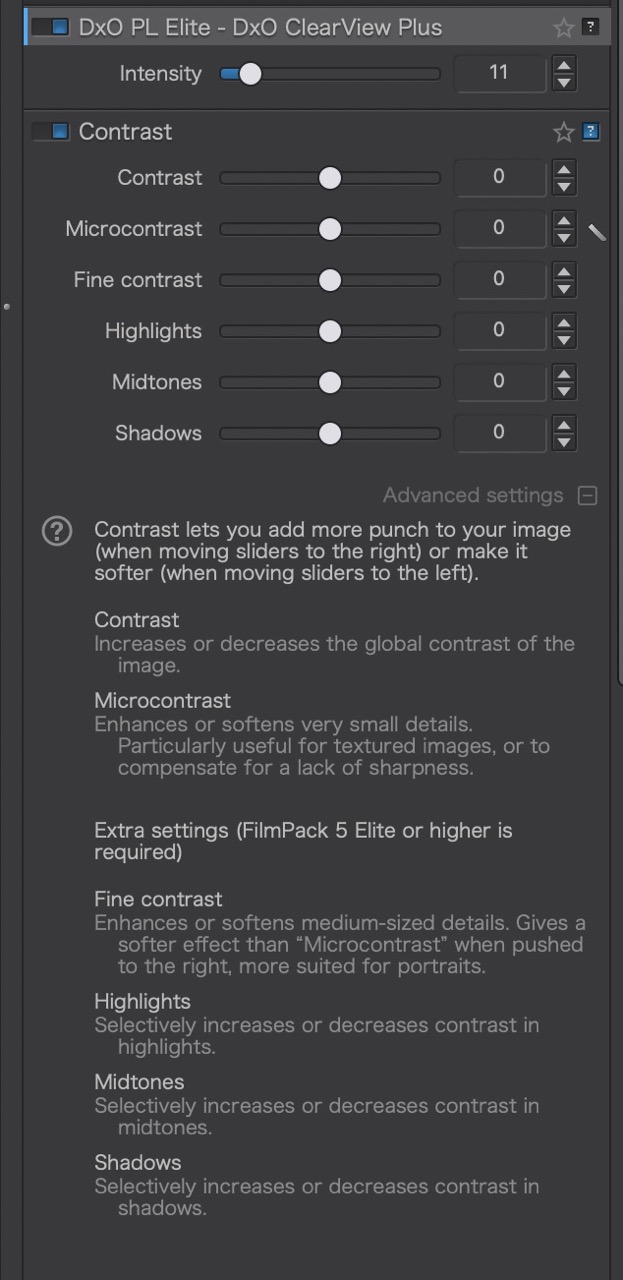
For reference: (screen shot of PhotoLab 9 panel that describes the differences between Fine and Micro contrast settings) *I do have FilmPack 7 installed which gives access to some of these extra settings.
p.3 #14 · DXO PhotoLab 9 with new AI Mask Technology
ruthenium wrote:
@LBJ2@ - This proves me wrong!
Thank you for correcting me.
I probably should have posted the reference panel with my original comment. I can see why the description of Fine and Micro contrast settings might be considered counterintuitive.
p.3 #15 · DXO PhotoLab 9 with new AI Mask Technology
EB-1 wrote:
I'm still not able to activate the demo. The message is that the server cannot be reached. It makes no sense since I have two separate full licenses used for 7 and 8 on this machine, and they show my status is verified after starting. I have no confidence that even if I pay for another license it will be able to activate.
p.3 #16 · DXO PhotoLab 9 with new AI Mask Technology
I got the demo to work. Unfortunately there are some significant changes to the sharpening settings. Previously there was -3.0 to +3.0 and now it is 0-200%. There is no direct mapping of the settings. I'm not sure why these numnuts keep making changes, so every year you cannot reproduce the same results. And once upgraded it's not to go back.
p.3 #17 · DXO PhotoLab 9 with new AI Mask Technology
EB-1 wrote:
I got the demo to work. Unfortunately there are some significant changes to the sharpening settings. Previously there was -3.0 to +3.0 and now it is 0-200%. There is no direct mapping of the settings. I'm not sure why these numnuts keep making changes, so every year you cannot reproduce the same results. And once upgraded it's not to go back.
EBH
Yes, I also noted this change. Even more, the auto default for sharpening in PL7 (or PL6) was 0 (zero). Subsequently, e.g. in PL8, this changed to +1 (and, I didn't like that, as I thought that sharpening at +1 resulted in oversharpening). In PL9, the default is at 100, and this corresponds to 0 (zero) of the versions prior to PL9. The past -0.5 now gives 85. I haven't encountered cases in my experience when added sharpening above 0 (in PL8) or the new 100 in PL9 was beneficial.
It is worth noting that the Microcontrast (that seems to be doing something very similar to what the Structure setting does in Capture One) has the effect that visually is perceived as sharpening as well.
Also the most aggressive DeepPRIME XD2s denoising adds an effect of refining fine details, akin to sharpening.
As a result, one should be careful when applying all three on an image, and may want to take a conservative approach when using the sharpening with Lens Sharpness Optimization.
p.3 #18 · DXO PhotoLab 9 with new AI Mask Technology
Different camera and lens combinations need different amounts. For example one Sony may need more denoising but less sharpening than one Canon. As well, some models have AA filters and some don't and some lenses are a bit sharper/contrastier than others. Finding the right settings and building the presets to load for batch processing takes a lot of time and effort. I have not tried loading PL8 presets into PL9 yet.
I doubt there is a direct mapping from 8 to 9 based on what I'm seeing and reading some threads on the DXO forums that they are aiming for consistency between cameras so settings for each camera may keep changing over time. https://forum.dxo.com/t/lens-sharpness-optimization-v2-question/51746
In the old days they used to say that doing the same thing and expecting a different result was a symptom of insanity. Now it's like doing the same thing and expecting the same result is crazy!
p.3 #20 · DXO PhotoLab 9 with new AI Mask Technology
EB-1 wrote:
Meanwhile, the lastest update for DXO 8 is 8.9. It is creating all kinds of ugly, light-colored, ragged blocks all over the screen at 100%.
EBH
Thanks for the heads up I use DXO 8 and won’t update until its fixed
I considered DXO 9 but my MacBook Pro is an M1 so don’t think it will work that well as people with newer MacBooks are having problems
To be honest version 8 is excellent anyway and as far as I understand the actual denoising results from raw conversion are no different